Forum Discussion

Platform SSO for macOS not working

 Microsoft
mshrm To confirm, you removed the following URLs from the profile?

After a few weeks of i'm back testing platform sso.
This is the current status:
- It is not working, even if the profile gets assigned successfully after removing some URLs. (Not working means, nothing pops up for the user to click through the final steps to activate PSSO.
- I've already worked through the mentioned article from intuneirl.
- The main issues are
- Company Portal is installed on the client but with installation failures in intune:
- "One or more apps contain invalid bundleIDs. (0x87D13BA2)"
- The installation itself was done just as MS described or the intuneirl blog described. (Download package, new LOB App, upload, ...)
- When manually opening the company portal app on the mac device it says "This is device is not registered" (I'm not sure if this really a problem or if it's just a consequence of the previous problem.)
- Company Portal is installed on the client but with installation failures in intune:
Result:
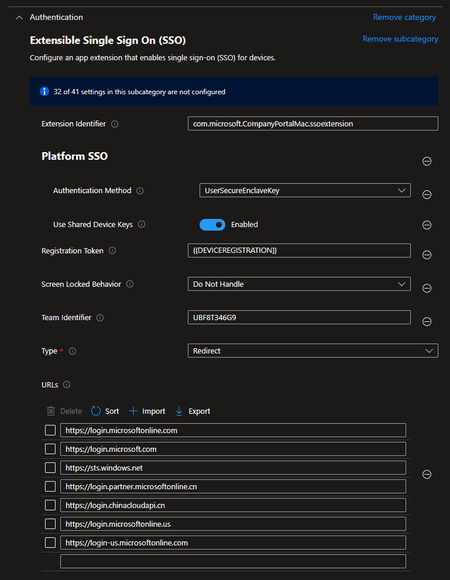
The whole deployment works just fine instead of plattform SSO is not popping up like mentioned e.g. in this screenshot:
And therefore nothing is registered inside the user account. When looking here the red area isn't there: (Screenshot from IntuneStuff Blog)
Any further ideas are highly appreaciated. I'm a little bit desperate already 😞
Mandi Ohlinger: Some information from your side?
Thanks everyone in advance
Patrick 🙂
- IntunestuffJul 10, 2024Brass Contributor
PatrickF11 , that screenshot isn’t from intuneIRL but from my site https://intunestuff.com. I’ve already made an update of the guide.
- PatrickF11Jul 11, 2024MCT
Intunestuff Oh sorry, i've immediately corrected this in my posting. I am surprised how I got this mixed up... Thank you for clarifying
RussMeyer-Epik
Thanks, but the apple business manager is only responsible for synchronizing the devices to intune. The deployment itself is via Intune of course.
Maybe there are other ways i didn't know, yet?
Are you sure the "Token to User mapping" is necessary in this scenario? Do you have any documentation regardings this in context using ABM?drumroll..... It works...
And the mistake was.... it was me... -.-
Although I said that I would check everything twice, I had a... blank space.... (right before the Extension Identifier value)
The pop-up appears immediately after this was fixed.
For the sake of troubleshooting i did not added the "token to user mapping", so i can clearly see what would have been the issue. Currently i'm testing the secure enclave mode and if it is working how it should work. I'm going to reply again when this is tested 🙂
(I've added a hint in the initial posting regarding the leading / trailing spaces in the configs and the URLs to be removed)
- IntunestuffJul 11, 2024Brass Contributor
PatrickF11 Thank you. Does it work now? Always willing to take a look at your config.
 PlatformerJul 01, 2024Copper Contributor
Hello PatrickF11 ,
I have exactly the same error messages, but unfortunately they don't say what is wrong.
For your information, delete all bundle IDs, keep only the bundle ID with the version number of the company portal. The app will then be installed without errors.
Also, no pop-up after login and no installation of the profile on the target system.
However, I get an interesting error message when I try to manually activate Platform SSO for the company portal.
You can try to generate the same message if you go to "System settings" -> "Passwords" -> "Password options" -> "Use passwords and passkeys from" -> here, activate company portal.In English it says:
"The use of master keys as an authentication method is not supported in your PlatformSSo configuration."I am strongly convinced that this is the 10001 error or is this error message related to the fact that the SSO profile is not installed on the target system?
For me, this means, all settings in the documentation are incorrect. What needs to be done here?
