Forum Discussion

Platform SSO for macOS not working
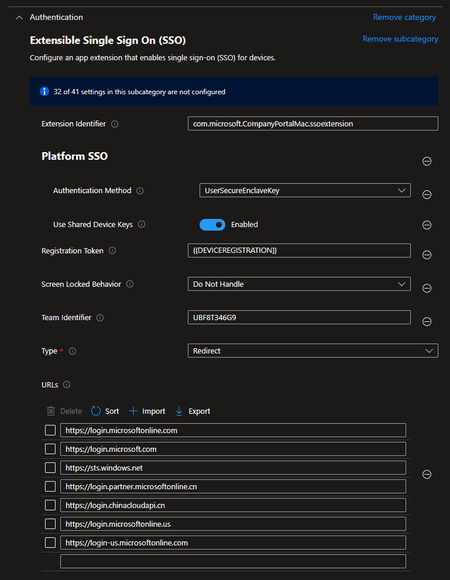

Hi Scott Breen, thanks for your feedback.
The test device i use is on macOS Sonoma, 14.5 (23F79).
At the first step i didn't have an sso extension profile becaue i did not find any advice to do so in the msdocs mentioned in my initial post.
After opening up a support case, which unfortunatelly wasn't successful, i was advices to create a sso extension template with this settings (applied to the device)
What MS Support told me is that Filevault needs to be in place.
- First issue: FileVault would only becomes active when the user logs in and confirms it.
- after this the support told me to create a filevault policy via settings catalog with the setting: "Force Enable In Setup Assistant". Unfortunatelly this profile isn't that effective, because the only thing that happens is that the user gets the following prompt:
After confirming this message nothing happens (no active filevault) and the message re-appears once in a while.

I had this on a fresh setup.
Fix was found after removing the US and CN based URLS from the PSSO configuration profile. After that, the profile successfully deployed without the error 10001.
I shared this on reddit too and another use had the same issue and same resolve with removing those URLs.
- PatrickF11May 30, 2024MCT
Okay i've removed four URLs and afterwards all the config was successful, BUT:
Entra PSSO isn't showing up the pop-up mentioned in the docs:
Do you have an idea? Let me outline all the configs i've made:
- Platform SSO policy
- Deployed via settings catalog to All Users
- Filevault Policy
- deployed via Endpoint protection policy instead of settings catalog, because settings catalog wasn't working as mentioned in my first posting.
- Company Portal App
- deployed via line-of-business app to all devices
So what am i missing?
- Whats missing for platform sso?
- How did you manage to activate filevault without user interaction? The endpoint protection policy asks the user for activation. In the settings catalog there is a policy which should enable filevault before the user logs in, unfortunatelly this wasn't working for me (Screenshot in 1st post).
Thanks in advance :--)
Patrick
- mshrmMay 30, 2024Copper Contributor
Fv not enabled. Doesn't seem to be a pre requisite.
My setup is a little unusual as company portal still thinks it's registered to another mdm, so I've forced bits through to get this working as a PoC. But I do have it working where I can login with any company entra account.
In the mac settings, under users, then network servers (I think, am away rn) there is an option to manually trigger the registration. Search for intuneirl, they've done a deep dive into PSSO and that helped a lot.
 seanlanganOct 08, 2024Copper ContributorThe deepdive fixed my issues in about 10 minutes.
- Platform SSO policy
- PatrickF11May 30, 2024MCTThis is SO great, it worked after removing the URLs. The only thing is, that the feature itself, so logging in with my Entra Credentials isn't there, but i'll have a look on it tomorrow. 🙂 I'll keep anyone here updated.
 Mandi OhlingerMay 30, 2024
Microsoft
mshrm To confirm, you removed the following URLs from the profile?
- PatrickF11Jun 27, 2024MCT
After a few weeks of i'm back testing platform sso.
This is the current status:
- It is not working, even if the profile gets assigned successfully after removing some URLs. (Not working means, nothing pops up for the user to click through the final steps to activate PSSO.
- I've already worked through the mentioned article from intuneirl.
- The main issues are
- Company Portal is installed on the client but with installation failures in intune:
- "One or more apps contain invalid bundleIDs. (0x87D13BA2)"
- The installation itself was done just as MS described or the intuneirl blog described. (Download package, new LOB App, upload, ...)
- When manually opening the company portal app on the mac device it says "This is device is not registered" (I'm not sure if this really a problem or if it's just a consequence of the previous problem.)
- Company Portal is installed on the client but with installation failures in intune:
Result:
The whole deployment works just fine instead of plattform SSO is not popping up like mentioned e.g. in this screenshot:
And therefore nothing is registered inside the user account. When looking here the red area isn't there: (Screenshot from IntuneStuff Blog)
Any further ideas are highly appreaciated. I'm a little bit desperate already 😞
Mandi Ohlinger: Some information from your side?
Thanks everyone in advance
Patrick 🙂
- IntunestuffJul 10, 2024Brass Contributor
PatrickF11 , that screenshot isn’t from intuneIRL but from my site https://intunestuff.com. I’ve already made an update of the guide.
