Forum Discussion

Zied_Berrima
Jun 01, 2022MCT
MDM Scope enrollement : Users or device groupe ?
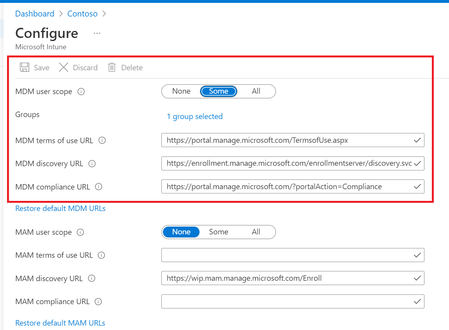
Hi I would like to know in this part, do I have to specify a group of equipment or a group of users? knowing that if I declare a user group, the user will be able to join his personal pc to azur...

NielsScheffers
Jun 01, 2022Iron Contributor
Somehow I can't open your screenshot, but if you can see the devices in the Intune portal, they are enrolled. The fact that the Azure AD device also shows "Intune" as the MDM is also an indication of that fact. As such, policies are applied to those devices.
Edit: misread your reply... you clearly state you can't see the devices in Intune.
If Azure AD thinks Intune managed them, they should appear in Intune. If you click on the Azure AD device, doesn't it show a "Manage" button in the top of the screen?

Zied_Berrima
Jun 01, 2022MCT
yes it show the "manage" button, what does it mean ?
- NielsScheffersJun 01, 2022Iron ContributorThat button will take you to the device in the Intune portal.
- Zied_BerrimaJun 01, 2022MCTyes i tested this and i have the same options like the intune portal , but also the device doesn't appear in the intune portal ...
- NielsScheffersJun 01, 2022Iron ContributorWell, we now know the device is enrolled and exists in Intune. Please keep in mind that searching works differently between the AAD and Intune portals.
If you search for the complete, exact device name, does it show up?