Forum Discussion

Intune Windows Update/Feature Update Ring applied but clients not updating


Hello HenrikInAB!
I am sure we can solve this together, I have some questions to get us going 🙂
- From the printscreen it seems the faulty device does not have a Primary User, is this the case for the working devices as well?
- Are the MDM-policies deployed to User och Device objects?
- Are you able to find any differences in the MECM client policy deployed to working/faulty devices?
- Please see this article. We want to make sure that we do not have a WUserver value pointing towards a WSUS-server. https://docs.microsoft.com/de-de/security-updates/windowsupdateservices/21669493
- Please see this article describing feature update(s) policy and Co-Management. https://docs.microsoft.com/en-us/troubleshoot/mem/intune/create-feature-update-hold-co-managed-devices
Let me know if above helps, otherwise we will keep digging 🙂
Best regards
Nicklas Ahlberg
https://nicklasahlberg.se/

I am facing exact similar issue and found .
Do we have any working solution and fix .
Note :
I can see all the registry values from : HKEY_LOCAL_MACHINE\SOFTWARE\Microsoft\PolicyManager\current\device\Update
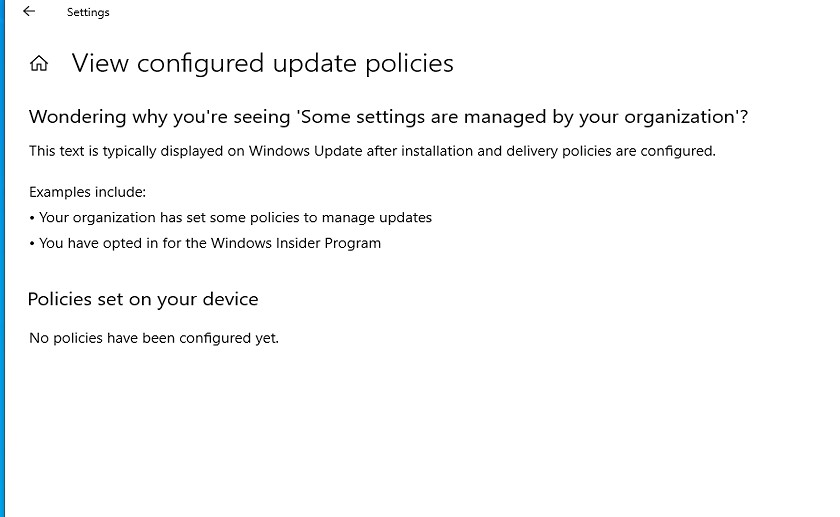
But when i goto Settings->Windows Update -> View Configured Update Policy -> still seeing "No policy have been configured Yet"
This is happening to only some computers (not all).
- NicklasAhlbergOct 10, 2021Brass Contributor
Hi,
this does probably come down to Co-Management workloads not being applied to the faulty devices yet.
Please try below to start the troubleshooting:
1. Open SCCM Agent from control panel or from cmd/Powershell by running: control smscfgrc2. Compare "Co-management capabilities" score on a faulty and a functional device... do both devices have same score?
//Nicklas
- MSIreportOct 11, 2021Copper Contributor
Thank youNicklasAhlberg .
I did compare the SCCM workload values and all are same but only the problem which i noticed after my deep dive was, i was able to see WUServer details from SCCM eventhough we disabled Software Update client policy.
Do we have any correct procedure from MS to handle this situation.
Thanks in advance.