Forum Discussion

Intune auto pilot international settings
 Mar 31, 2022
Rudy_Ooms_MVP thanks for your help.
My xml was wrong. I ended up creating a different app with a CMD file in it and the xml inside the win32 package. I also separated the PowerShell script to add the language to a different win32 package.
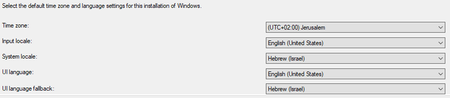
For anyone requiring something similar here is my xml:
<gs:GlobalizationServices xmlns:gs="urn:longhornGlobalizationUnattend">
<gs:UserList>
<gs:User UserID="Current" CopySettingsToDefaultUserAcct="true" CopySettingsToSystemAcct="true"/>
</gs:UserList><!-- GeoID -->
<gs:LocationPreferences>
<gs:GeoID Value="117"/>
</gs:LocationPreferences><gs:MUILanguagePreferences>
<gs:MUILanguage Value="en-US"/>
<gs:MUIFallback Value="he-IL"/>
</gs:MUILanguagePreferences><!-- system locale -->
<gs:SystemLocale Name="he-IL"/><!-- input preferences -->
<gs:InputPreferences>
<gs:InputLanguageID Action="add" ID="0409:00000409"/>
<gs:InputLanguageID Action="add" ID="040D:0002040D"/>
</gs:InputPreferences>
<gs:UserLocale>
<gs:Locale Name="he-IL" SetAsCurrent="true" ResetAllSettings="false">
</gs:Locale>
</gs:UserLocale>
</gs:GlobalizationServices>For detection of the application:
try{
    $DefaultHive = "microsoft.powershell.core\Registry::HKEY_USERS\.DEFAULT"
    $CP = Join-Path -Path $DefaultHive -ChildPath "Control Panel\International"
    $KL = Join-Path -Path $DefaultHive -ChildPath "Keyboard Layout\Preload"
    $DHCP = Get-ItemProperty -Path $CP
    $DHKL = Get-ItemProperty -Path $KL
    if($DHCP.Locale -eq "0000040D" `
    -and $DHCP.LocaleName -eq "he-IL" `
    -and $DHCP.iCountry -eq "972" `
    -and $DHKL.1 -eq "00000409" `
    -and $DHKL.2 -eq "0000040D"){
        Write-Output "Profile international settings were copied successfully"
        exit 0
    }else{
        Write-Error "Error copying profile international settings"
        exit 1
    }
}catch{
    $ErrorMessage = $_.Exception.Message
    Write-Error $ErrorMessage
    exit 1
}
Rahamim

Hi
Normally I would say to create a powershell script with the additional language cab in it. And configure all settings you want in that powershell script. as example
DISM /Online /Add-Package /PackagePath: .\lp.cab
Set-WinUILanguageOverride <xx-xx> (where xx-xx is your language culture)
And convert it to a win32 app and deploy it as an required app during autopilot esp?
Could you show us what you have tried until know?
I just found found the site Michael Niehus' website https://oofhours.com/ and realized I only did half of what AutoPilot has to offer. I found out I didn't use the enrollment status page . I'm trying to work with it now to see if that will do what I'm looking for.
Also, can someone tell me the keyboard shortcut to open cmd in ESP?
- Feb 17, 2022Hi, Shift + f10... but that one needs to be removed 😛
https://call4cloud.nl/2022/01/the-oobe-massacre-the-beginning-of-shift-f10/
I guess also did some blogs about autopilot and some tpm stuff..- RahamimLFeb 17, 2022Iron ContributorThanks for the help will update on this as soon as I will have results.