microsoft intune
22 Topics
Best approach for migrating AD joined devices to Entra ID without wiping user profiles?
We’ve seen many organizations struggle with device migration when moving from traditional Active Directory (AD) or hybrid environments to Microsoft Entra ID. The biggest challenge is avoiding user disruption especially when wiping devices causes profile loss, app reconfiguration, and downtime. In large environments, wipe-and-reload becomes difficult to scale and impacts productivity significantly. Curious to know how others are handling this: Are you still using wipe/reimage methods, or are you using alternative approaches that preserve user profiles, applications, and settings? Would love to hear practical experiences from the community.1.9KViews2likes8Comments
Intune – Unable to reliably validate application installation status via Microsoft Graph APIs
Hi Everyone, I am working on application deployment and validation using Microsoft Intune, and I am trying to implement an automated validation step to confirm whether applications are successfully installed. My primary requirement Verify application installation status Confirm per‑device installation status Validate installation for specific Intune‑managed devices Use Graph APIs as part of an automation workflow APIs tested so far 1️⃣ App installation status per device (NOT working / not usable) I initially tried using the documented API: HTTP GET https://graph.microsoft.com/beta/deviceAppManagement/mobileApps/{mobileAppId}/deviceStatuses Issue: This API is not working for us It either returns no data or behaves as if it is not a valid / usable endpoint It does not return reliable installation status Hence, we cannot use this API for validation in automation At this point, deviceStatuses is not usable as a primary source of truth in our environment. 2️⃣ Detected Apps (secondary confirmation only) We are also using the Detected Apps API: HTTP GET /deviceManagement/managedDevices/{deviceId}/detectedApps This does work, however: It only confirms app presence It does not confirm Intune assignment or installation intent We are using it strictly as a secondary confirmation, not a primary validation method 3️⃣ Intune internal API observed via browser inspection We also tested the API that appears to be used internally by the Intune portal: HTTP GET https://graph.microsoft.com/beta/users/{user-id}/mobileAppIntentAndStates/{device-id} Observations: The API returns data However, installState frequently shows unknown The Intune portal shows a different and final status (Installed / Failed / Pending) This makes the API unreliable for automation It appears to be troubleshooting‑oriented, not intended for reporting or validation Questions I am looking for guidance on Is deviceStatuses known to be unreliable, tenant‑dependent, or effectively unsupported? What is the recommended API to retrieve actual app installation status per device? Are there any v1.0 APIs available for: Device‑level app installation status? User‑level app installation validation? What is Microsoft’s recommended best practice to validate Intune‑installed applications via automation? Is there official documentation that clearly explains: Which API should be used for reporting vs troubleshooting Expected delays or data inconsistencies between Graph APIs and the Intune portal Goal The goal is to build a reliable and supported automation‑based validation mechanism to confirm that Intune‑deployed applications are successfully installed on target devices. Any official guidance, confirmation of known limitations, or alternative approaches would be very helpful. Thanks in advance for your support.318Views0likes1Comment
Turn on Memory Integrity through Microsoft Intune
Hi, Question: How to turn on the following setting through Microsoft Intune? Windows Security > Device Security > Core isolation > Memory Integrity (It says: Memory integrity is off. Your device may be vulnerable.) Applied licenses: Microsoft Intune Suite + Microsoft Defender for Endpoint P2 Client OS: Windows 11 It has been weeks since I already applied the following through the Security Baseline Policy for Windows 10 and Later but still the Memory Integrity has not got enabled on any client: Device Guard Credential Guard: (Enabled with UEFI lock): Turns on Credential Guard with UEFI lock. Enable Virtualization Based Security: enable virtualization based security. Require Platform Security Features: Turns on VBS with Secure Boot and direct memory access (DMA). ------ Virtualization Based Technology Hypervisor Enforced Code Integrity: (Enabled with UEFI lock) Turns on Hypervisor-Protected Code Integrity with UEFI lock. The Windows Baseline Security has got applied successfully on all endpoints without any errors or conflicts. Intune Sync and device restart have been performed 100s of times but in vain. Any suggestions would be highly appreciated.2.4KViews0likes0Comments
RBAC Access and scope tags not showing the correct amount of devices within the device list?
Hi, Is anyone else experiencing issues with the RBAC/Scope Tags within Intune? For example, A Department manager has access to HR devices within Intune and should see 60 Windows devices within the devices section, but can only see 25 devices declining slowly over time randomly until it plateaus to having only a few devices left. However global administrators can see all 60 devices when filtering the device category to HR. No configuration changes were made and this is happening across all departments.773Views0likes1CommentUpgrading Windows 11 on Co-Managed Entra Joined Devices with Intune
Dear Support, All of our Windows 10 devices are managed through SCCM and Microsoft Intune, with shared workloads piloted through Intune. Below are the details from one of our testing devices, Here is the testing device details, Co-management configuration settings: As per the instructions provided , I have created a profile under "Update rings for Windows 10 and later" and manually synced it from the company portal, Intune device console, and Account or Work School > Info > Sync. However, I do not see any prompts or progress regarding the Windows 10 upgrade. I verified in event viewer, Application and Services Logs > Microsoft > Windows > DeviceManagement-Enterprise-Diagnostics-Provider -> admin, I see there was an error “MDM Session : OMA-DM message failed to be sent. Result: (Unknown Win32 Error code: 0x801901ad)” I checked in google the error message indicates that, the device was unable to sync because of network connection issues so restarted the device to see if this error get rid from the event viewer but I got another issue in event viewer , “MDM ConfigurationManager: Command failure status. Configuration Source ID: (E97E6844-D6DA-4626-8E08-2981CAC4E66F), Enrollment Name: (MDMDeviceWithAAD), Provider Name: (Policy), Command Type: (Add: from Replace or Add), CSP URI: (./Device/Vendor/MSFT/Policy/ConfigOperations/ADMXInstall/Receiver/Properties/Policy/FakePolicy/Version), Result: (The system cannot find the file specified Not sure whether because of this error windows 11 upgrade is failed? Dsregcmd /status , WUfB Policy registry entries and values: Could you please assist in providing guidance on how to upgrade Windows 10 for hybrid devices?Solved5.8KViews0likes10Comments
Re-Enabling Lost Devices
When I attempt to disable lost mode, the status is stuck on pending, and the device itself is still in lost mode. In order to troubleshoot this, I've connected the device to LTE via an activated SIM, which did not resolve the issue. I'm able to restore the devices, but I'd like to back up the data before I wipe them. I have a number of devices, iPhones and iPads, that I'm working on. Any ideas as to next steps?15KViews0likes5Comments
Intune auto pilot international settings
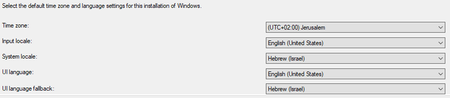
Hi everyone, I'm trying to achieve the following for new computers in autopilot: Set time zone to my time zone Set system locale, culture and windows home location to my country Set a language list to use en-US and my country's language Make sure that my country language is installed on the compute In MECM this is the Apply windows settings which looks like this: The end result I'm looking for is this: I searched the web and also found the Copy-UserInternationalSettingsToSystem, but this is for windows 11... We are still deploying windows 10. I found and tested multiple options such as deploying the LXP and using several powershell commands to apply what I need but it doesn't exactly work. This is my autopilot profile: Is there a way to use some unattended file or any other way to configure the operating system to our international settings? Rahamim.Solved13KViews0likes9Comments
Schedule restart for user's laptop which are enrolled to organizational domain.
Hi All, Will it be possible to give the users an option to schedule the automated restart on intuned laptops? As if now it is only giving two option one is to restart now and the other one is to restart after five minutes and the user are having trouble with their working.466Views0likes0CommentsEvent Grid for Intune?
Hi! I have an app (TOPdesk) where I am currently trying to integrate with Intune. I have learned that Azure has Event Grids and I can use this to fire off PowerShell Runbooks to execute a PS script which will then send off an HTTP request to connect to my app. The question that came to mind is whether it's possible for Event Grids to listen in to activities from Intune? Basically, I was thinking that whenever a new device is created, the Event Grid can help trigger a runbook to send off a HTTP request to connect to the app. Unfortunately, I have no access to Intune and Event Grid so I cannot confirm this myself. Any insight or alternatives will be appreciated! Thanks!1.3KViews0likes0CommentsHow to Setup Endpoint Manager RBAC
📌My new blog post on setting up Endpoint Manager RBAC permissions. In this article I explain how to assign the admins with correct and enough access without assigning them the powerful Intune Admin role. Hope this helps to anyone who is planning on introducing and setting up RBAC in their Endpoint Manager environment. https://shehanperera.com/2022/05/12/endpoint-manager-rbac/920Views0likes0Comments