Forum Discussion

Device Compliance
- Mar 18, 2019
Baljit Aujla I have figured out the solution.
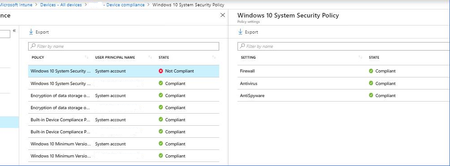
When you have Compliance policy, assigned to All Users, it will reflect all your Azure AD users with those logins. But what about other (local accounts), like "system account" etc.., they are not compliant.
Resolution is to have another additional (same) compliance policy, assigned to Azure AD security group, and add those (shared) windows 10 devices to the group.
In that case, Compliance policy is assigned on device level to the specific device, and then "system account" does not cause the problem.
It is poorly documented, but this is something that Microsoft Support given to me...

dustintadam in my case (all users) there is no option to assign the same policy to other things then. I think it should be enough to have one policy and assign to multiple security groups at the same time..

Awesome, thanks! I'll give it a shot.
- pauljeffcottMar 21, 2019Copper ContributorAny resolution for you Dustin? I still have System Account showing as not compliant, with the Compliance profile assigned to device security group as well as the user security group. Company Portal app tells the user they are out of compliance.
- dustintadamMar 21, 2019Iron Contributor
It didnt work for me, we still have a bunch of clients that are failing compliance because of the System Account.
- bbhorriganMar 21, 2019Brass Contributor
I had the same issue until we updated Windowsdustintadam

