Forum Discussion

Device Compliance
- Mar 18, 2019
Baljit Aujla I have figured out the solution.
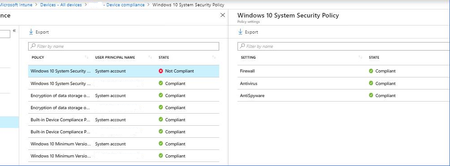
When you have Compliance policy, assigned to All Users, it will reflect all your Azure AD users with those logins. But what about other (local accounts), like "system account" etc.., they are not compliant.
Resolution is to have another additional (same) compliance policy, assigned to Azure AD security group, and add those (shared) windows 10 devices to the group.
In that case, Compliance policy is assigned on device level to the specific device, and then "system account" does not cause the problem.
It is poorly documented, but this is something that Microsoft Support given to me...


I also have issue, where we deploy Intune "Compliance policy" to "All Users", and is also effecting the integrated "System Account" and overall device compliance status.
Example is also, for shared devices (shared meeting room windows pc etc.)
We have latest Windows 10 - 1809 with all further updates

Going to +1 this, while Microsoft's own documentation does state that non-compliance for the System Account will not impact a machines' overall compliance, it can make proactively addressing compliance issues more difficult. For example, the Machine compliance report in InTune seems to be correctly ignoring machines where the non-compliance is the System Account identity, but the Power BI report pack that leverages the InTune data warehouse does not.
Ideally, if the compliance state of the System Account doesn't matter, it would be preferable that InTune ignore the identity entirely and didnt report on it.
 BillyHMar 17, 2019Copper ContributorHave the same issue on several configuration policies in Intune reporting Error or Failed on the System Account