Forum Discussion

Device Compliance
- Mar 18, 2019
Baljit Aujla I have figured out the solution.
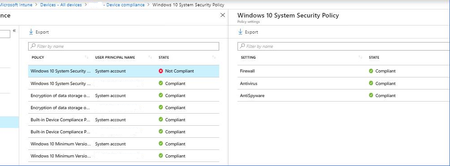
When you have Compliance policy, assigned to All Users, it will reflect all your Azure AD users with those logins. But what about other (local accounts), like "system account" etc.., they are not compliant.
Resolution is to have another additional (same) compliance policy, assigned to Azure AD security group, and add those (shared) windows 10 devices to the group.
In that case, Compliance policy is assigned on device level to the specific device, and then "system account" does not cause the problem.
It is poorly documented, but this is something that Microsoft Support given to me...


The Admin Account Compliance problem wouldn't be solved when using bitlocker via user and not via computer assignment, isn't it?

Hi, good point and I don't know. I'm only following instructions that I haven't completed yet. I'm getting into a real plate spinning exercise where all my attempts to apply some sort of MDM hit some sort of issue, usually in the area of confirming what I've asked is actually done. I spend a lot of my time dealing with MS Intune support, who are very nice, but can't really help when the product is not helping them, in my opinion of course, but it is frustrating.