Forum Discussion

JonRoweMagnolia
Jul 27, 2021Copper Contributor
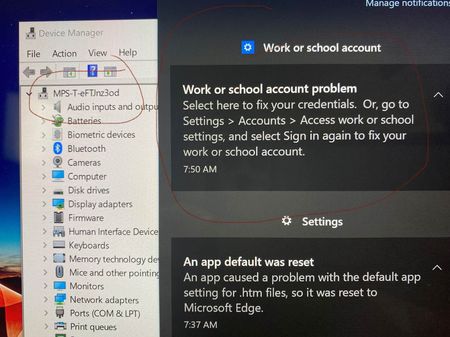
Config Profile OneDrive auto Sync and Folder Redirect issues - "Select here to fix your credentials"
e just recently started moving our environment into intune for a ~2500+ device deployment for teachers/admin/students. We have a Hybrid AD Domain Join step that starts it and joins it to our on prem...

Jul 27, 2021
Hi,
When looking at your question. It looks like you are enrolling existing devices?
Just a few questions:
*Did you monitor what happens each step/reboot with using dsregcmd /status ?
*Were the device already registered ? (existing devices --> teams --> allow to manage this device)
*Before enrolling did you check out this reg setting if there already exisiting enrollments:
HKEY_LOCAL_MACHINE\SOFTWARE\Microsoft\Enrollments
*Did you configure:
Computer Configuration > Policies > Administrative Templates > Windows Components > Device Registration.
*Maybe configuring the scp with a gpo yourself?
*Maybe configuring the mdmwinsovergpo scp setting to make sure MDM policies win

JonRoweMagnolia
Jul 27, 2021Copper Contributor
To answer your questions :
*Did you monitor what happens each step/reboot with using dsregcmd /status ? I have not, i'm admittedly new to the admin side of this and learning as I go and receiving training while we're quickly approaching school starting and having to hand out devices and make it work. we're getting there, but not there yet. i'll research this command and make use as we proceed...thank you
*Were the device already registered ? (existing devices --> teams --> allow to manage this device) Devices are new / straight out of the box
*Before enrolling did you check out this reg setting if there already exisiting enrollments:
HKEY_LOCAL_MACHINE\SOFTWARE\Microsoft\Enrollments I did not, but will look into this.
*Did you configure:
Computer Configuration > Policies > Administrative Templates > Windows Components > Device Registration. I did not...i configured computer>policies>administrative templates>Windows Components>MDM> enable automatic MDM enrollment using default Azure ad credentials. Should I do device registration?
*Maybe configuring the scp with a gpo yourself? I'll look into this
*Maybe configuring the mdmwinsovergpo scp setting to make sure MDM policies win i'll look into this as well...
Lot of this is greek, but helps greatly as I get closer to fully understanding this monster. Thank you!
(any other suggestions are greatly appreciated)
*Did you monitor what happens each step/reboot with using dsregcmd /status ? I have not, i'm admittedly new to the admin side of this and learning as I go and receiving training while we're quickly approaching school starting and having to hand out devices and make it work. we're getting there, but not there yet. i'll research this command and make use as we proceed...thank you
*Were the device already registered ? (existing devices --> teams --> allow to manage this device) Devices are new / straight out of the box
*Before enrolling did you check out this reg setting if there already exisiting enrollments:
HKEY_LOCAL_MACHINE\SOFTWARE\Microsoft\Enrollments I did not, but will look into this.
*Did you configure:
Computer Configuration > Policies > Administrative Templates > Windows Components > Device Registration. I did not...i configured computer>policies>administrative templates>Windows Components>MDM> enable automatic MDM enrollment using default Azure ad credentials. Should I do device registration?
*Maybe configuring the scp with a gpo yourself? I'll look into this
*Maybe configuring the mdmwinsovergpo scp setting to make sure MDM policies win i'll look into this as well...
Lot of this is greek, but helps greatly as I get closer to fully understanding this monster. Thank you!
(any other suggestions are greatly appreciated)
- Jul 27, 2021So these are new devices. So you unpack them , add them to the domain and?
*When you add them to the domain manually it will take some time before azure ad sync will sync the device to azure (if the scope is configured correctly by default 30 minutes). Maybe speeding this up : https://github.com/steve-prentice/autopilot/blob/master/SyncNewAutoPilotComputersandUsersToAAD.ps1
*Check the User Device Registration log to make sure you will notice : Automatic registration Succeeded. Otherwise the user needs to log out and back in again.... again you can speed this up by triggering the scheduled task
"\Microsoft\Windows\Workplace Join\Automatic-Device-Join"
*dsregcmd /status and the event log will give ou the info you will need to understand the process 🙂