Forum Discussion

tyoop
Aug 27, 2026Copper Contributor
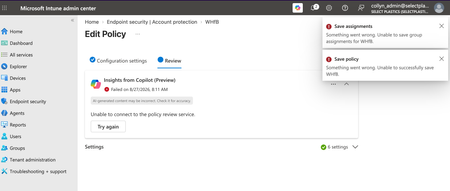
Account Protection Policy Unable to Save
I am trying to configure an Account Protection policy to allow but not enforce Windows Hello for Business in my org's tenant. If I configure any of the device- or user-settings, the policy throws an ...

Michael112
Aug 30, 2026Copper Contributor
Likely culprits, in order of probability:
- Known Account Protection UI bug – the consolidated blade sometimes throws generic save errors even on valid configs, especially after a recent service release. Given the timing, this looks more like a platform issue than your setup.
- Check Service Health – Admin Center → Tenant administration → Message center/Service health for active Intune advisories.
- Workaround: use Settings Catalog instead – same WHfB settings, usually saves fine when the Account Protection blade won't.
- Try incognito/different browser – rules out stale cached JS from a recent backend update.
- Watch for tenant-wide WHfB policy conflicts – once it saves, make sure Devices → Enrollment → Windows Hello for Business isn't also configured, or it can override your "allow, don't enforce" intent.
If you can grab the actual error code from the browser's dev console (Network tab, failed POST), that'd help pin it down faster.