whfb
4 Topics
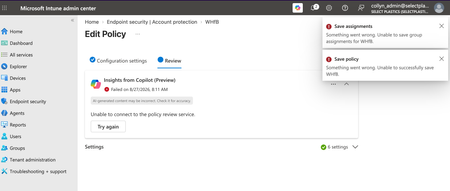
Account Protection Policy Unable to Save
I am trying to configure an Account Protection policy to allow but not enforce Windows Hello for Business in my org's tenant. If I configure any of the device- or user-settings, the policy throws an error when trying to save. Two errors actually, both pretty generic. This has been persisting for the last 24hrs. Does anyone know what may be the culprit here?477Views0likes5Comments
Win 10 Security Baseline: Issue with WHFB
Hi, I activated the Intune Win 10 security baseline on a set of devices. I know experience an issue with WHfB. My face and fingerprint is not recognized, rsp. the login process is giving an error, saying that I cannot be identified. One user reports, that when away from company WhfB works as expected, asking for face or fingerprint and as second factor a PIN. I have another policy in Intune that is giving MDM policies precedence over GPO, so I cannot understand why it works for that one user when outside of company. What settings in MDM security Baseline could possibly be the cause resp. be responsible for broken WHfB?543Views0likes6Comments
WHfB prompting for password at first login
Hi All, I can't seem to get these Intune policies correct for WHfB (Windows Hello for Business) I want WHfB active using a pin for a customer. I have a test VM setup and registered with WHfB correctly. When you first power on the machine and login, there is no prompt for a pin, only the M365 password. Once logged in, I can lock, or log off and I am prompted with the PIN login. I restart the VM and I am pack to having to use a password for the initial login. I have WHfB setup in the following areas Endpoint security | Account protection (Assigned to All devices and All users) Use Windows Hello for Business (Device) - True Use Windows Hello for Business (User) - True (tried without this first) Minimum PIN length - 6 Devices | Enrollment Configure Windows Hello for Business - Enabled TPM - Preferred Minimum PIN length - 6 Allow biometric - Yes Allow phone sign-in - Yes Devices | Configuration (assigned to All users & All devices) Turn on convenience PIN sign-in - Enabled Minimum PIN Length (User) - 6 Use Windows Hello For Business (User) - True Use Remote Passport - Enabled Allow Use of Biometrics - True I know there is quite some double up having this configured at all possible levels. I started with Device enrollment and a configuration profile, and then moved to Account protection. I'm currently going round in circles trying to work out why the initial login isn't prompting for a PIN. (I also built a new VM and it's doing the same thing). Although, first reboot it worked fine from memory. Thanks in advance Guru'sSolved1.3KViews0likes3Comments
Windows Hello for Business - Biometrics
Hi all, I disabled WHFB tenant wide, but created an Identity Protection configuration for it and applied it to one test machine. That works fine. Reading the documentation here: https://learn.microsoft.com/en-us/mem/intune/protect/identity-protection-windows-settings , it states if I leave Allow Biometrics to "Not Configured" Not configured (default) - Windows Hello for Business prevents biometric authentication (for all account types). It will prevent biometrics. This doesn't appear to be the case as my test laptop is prompting for fingerprint enrollment during the WHFB setup. Is the documentation wrong? Is there anyway I can disable biometrics for a device or group of devices?1.9KViews0likes1Comment