Forum Discussion

tyoop
Aug 27, 2026Copper Contributor
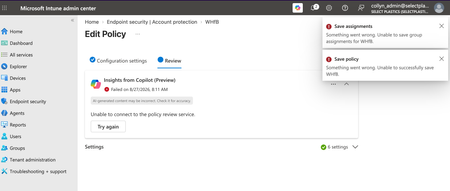
Account Protection Policy Unable to Save
I am trying to configure an Account Protection policy to allow but not enforce Windows Hello for Business in my org's tenant. If I configure any of the device- or user-settings, the policy throws an ...

awaqas1700
Aug 30, 2026Copper Contributor
This is usually one of a few things — worth checking in this order since the errors are generic ("unable to save assignments" + "unable to save policy"):
- Ignore the Copilot "Insights" failure for now — that's the separate AI policy-review preview service, and its outage doesn't mean your actual save will fail. Don't let that banner distract from the real error.
- Check the group assignment first. "Unable to save group assignments for WHfB" often points to a stale or still-processing dynamic group, a deleted/renamed group still referenced somewhere, or a group that's too large and timing out. Try saving with All Users/All Devices temporarily — if that saves fine, the issue is the specific group.
- RBAC/scope tags. If your account has a custom role or scope tag restriction, Intune can throw a generic "unable to save" error instead of a clear permissions message. Confirm the account has full Endpoint Security Manager (or Intune Administrator) rights and the right scope tag on the policy.
- Browser-side issue. Try an InPrivate window or a different browser — the Intune admin center UI occasionally caches a broken policy state that a fresh session clears.
- Check Intune service health. Go to Tenant administration > Message center, or the M365 Service Health dashboard — WHfB/Account Protection policy save failures have shown up before during backend service incidents, and they usually resolve without any tenant-side fix.
- If it's been 24+ hrs and none of the above helps, try creating the same policy via Graph API or PowerShell (Set-MgDeviceManagementConfigurationPolicy or the Graph beta endpoint) — it'll often surface a real error code/message instead of the generic UI banner, which is much easier to search or escalate on.
If you can share the exact error code (not just the generic text) from the browser dev console network tab, that'll narrow it down further.