Forum Discussion

-2016281112 (Remediation failed) - Minimum Password Length
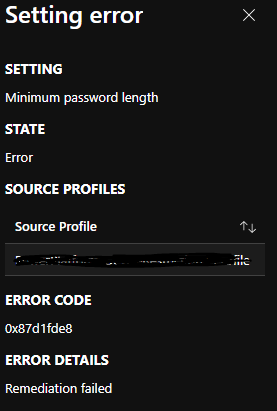
- May 05, 2021
Hi
So even only specifying: Require
Password type --> Default
Minimum password --> 8
Is giving you non compliant errors in a new device compliance policy

What I am trying to say. Is that when you create some device configuration policies like this example to create a local admin user and a corresponding password.
It will always fail... (the reporting) even when the user and the password were created.
To quote someone (have it in my internal docs... but.. not sure who said it )
The error here is due to the status check mechanism that is implemented within. In general, when Intune tries to determine if the policy takes effect on the target device, it calls Get Operation of the interested OMA-URI, which basically queries the registry key value from the client. And then compare the result with the policy value.
The problem is that this CSP only supports Add Operation, which means the Get Operation will always fail because it has not been implemented. That's why we get the error even if it successfully applied.

Did you, by any chance, read or heard when they will implement the Get? It kind of makes Intune Password Compliance Policy useless as we do not know what is compliance or not?
Thank you.
Don
- Dec 30, 2021I Know... bit I wonder if this one will ever be fixed...
- Dom_CoteNov 27, 2023Iron ContributorThis is 100% repro when you join a previously personal device (MSA connected) to Entra later. The same account with the same policies (and password, obviously) goes through fine if the device is Entra joined during OoBE.
I bet it's caused by MSA passwordless sign-in and onboarding, meaning the personal profile effectively has a password length of "zero" - although the work profile's password / Hello PIN is fully compliant.  Reuben7041Jul 12, 2023Copper Contributor
Rudy_Ooms_MVP Do you know if this has been remediated or when it will as I am having similar challenge (error message).
