Forum Discussion

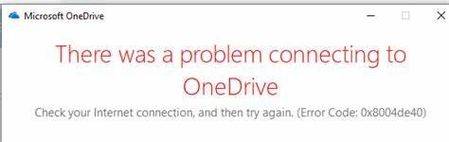
Windows server 2012 R2 -Onedrive sync -Error Code 0x8004de40 when signing in to OneDrive
 Feb 22, 2022
Final resolution:
Download IIS Crypto (https://www.nartac.com/Products/IISCrypto/
Add the following Keys to the 1st and 2nd position respectively (they weren't there on 2 servers I've tested so far)
TLS_ECDHE_RSA_WITH_AES_256_GCM_SHA384
TLS_ECDHE_RSA_WITH_AES_128_GCM_SHA256
Find and move the following keys to the 3rd and 4th position respectively (they are there but not in the right order)
TLS_DHE_RSA_WITH_AES_256_GCM_SHA384
TLS_DHE_RSA_WITH_AES_128_GCM_SHA256
Make sure all of the check boxes are selected, press Apply, reboot the server.
Refernece Blog:https://www.reddit.com/r/sysadmin/comments/ngingn/server_2012r2_onedrive_error_0x8004de40/

Final resolution:
Download IIS Crypto (https://www.nartac.com/Products/IISCrypto/
Add the following Keys to the 1st and 2nd position respectively (they weren't there on 2 servers I've tested so far)
TLS_ECDHE_RSA_WITH_AES_256_GCM_SHA384
TLS_ECDHE_RSA_WITH_AES_128_GCM_SHA256
Find and move the following keys to the 3rd and 4th position respectively (they are there but not in the right order)
TLS_DHE_RSA_WITH_AES_256_GCM_SHA384
TLS_DHE_RSA_WITH_AES_128_GCM_SHA256
Make sure all of the check boxes are selected, press Apply, reboot the server.
Refernece Blog:https://www.reddit.com/r/sysadmin/comments/ngingn/server_2012r2_onedrive_error_0x8004de40/