Forum Discussion

Deleted
Dec 13, 2016Not applicable
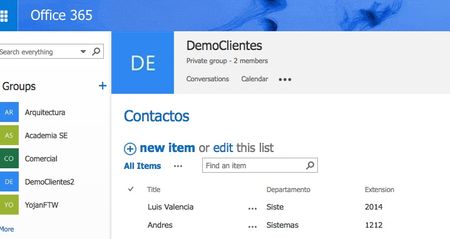
Where is my PowerApps and Flow buttons in the list?
Yesterday playing with my new team site, I created a list, however when I click on the list, I dont see the powerapps or flow button, it goes to a different UI-like-group experience. I am not su...

Asif Rehmani
Dec 13, 2016MVP
Most of the times you can change the modern list experience directly within the settings of the list or Library. The same settings also exist at the tenant level for SharePoint Online Administration page. I would advise looking at each of those things to see if you can change the setting there.

Dec 13, 2016
From what I see, this list is using the old UI so that's the reason we you don't see Flow action: How did you create the list?
- DeletedDec 13, 2016Not applicable
The site is a modern team site, I created the list just the normal way in modern team sites, New Button at the top, List, and then immediately I saw that UI, not the modern UI.
Maybe is a setting tenant wide?
- Dec 14, 2016Try to create the list from the Site Contents page
- DeletedMay 03, 2017Not applicable
I am having the same situation where I am not seeing the PowerApps button on my list. Another odd feature is that I have New Experience set at the tenant level for Lists and Libraries. When I create a new list it still defaults to the Classic Experience when it is created. When I change it manually to the New Experience I still see no PowerApps button. Any ideas?