Forum Discussion

SebCerazy
Jun 16, 2022Iron Contributor
What is the deal with Office (mail) retention policies?
Seems that none of the available writeups do actually reflect any more what I can see in my environment Exchange Online (pure) So here: https://docs.microsoft.com/en-us/exchange/recipients/user...
- Jun 16, 2022So, first thing here - there are two types of retention policies. The "old" Exchange ones, that deal with only Exchange items, and offer more granularity. The "new" ones, that are configurable from the Purview portal and are M365-wide, but offer less granularity. In your case, you need the former, so use the (classic) Exchange admin center to create/assign to the user.
There's another gotcha here - few years back Microsoft made a change in the service, effectively ignoring the default Deleted Items tag. Apparently too many users were complaining about messages in the Deleted items disappearing after some time. So to make a Deleted items tag work now, you have to either rename the default policy or create a new one and assign it to the user.
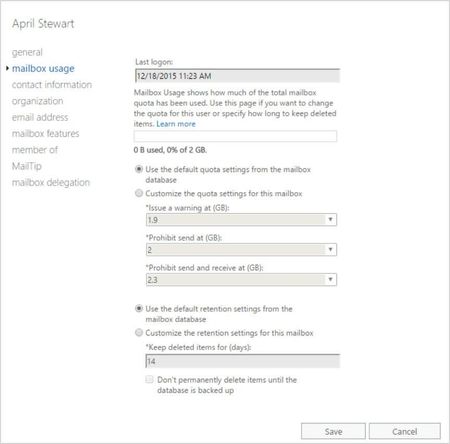
In a nutshell, here's what you need to do. Go to the classic EAC > Compliance management > Retention tags. Make sure a "Deleted items" tag exists, create one if necessary and adjust the period as needed. Once the tag is created, you need to assign it to a policy, so go to the Retention policies tab. Create a new policy, assign the Delete items tag (don't forget to assign other tags as needed). Then go to Recipients > mailbox > select the mailbox in question > Mailbox features > select the new retention policy. Then wait, as it can take up to 7 days for ExO to process the changes. You can periodically check the Deleted items folder properties for the presence of the newly assigned tag.

VasilMichev
Jun 16, 2022MVP
So, first thing here - there are two types of retention policies. The "old" Exchange ones, that deal with only Exchange items, and offer more granularity. The "new" ones, that are configurable from the Purview portal and are M365-wide, but offer less granularity. In your case, you need the former, so use the (classic) Exchange admin center to create/assign to the user.
There's another gotcha here - few years back Microsoft made a change in the service, effectively ignoring the default Deleted Items tag. Apparently too many users were complaining about messages in the Deleted items disappearing after some time. So to make a Deleted items tag work now, you have to either rename the default policy or create a new one and assign it to the user.
In a nutshell, here's what you need to do. Go to the classic EAC > Compliance management > Retention tags. Make sure a "Deleted items" tag exists, create one if necessary and adjust the period as needed. Once the tag is created, you need to assign it to a policy, so go to the Retention policies tab. Create a new policy, assign the Delete items tag (don't forget to assign other tags as needed). Then go to Recipients > mailbox > select the mailbox in question > Mailbox features > select the new retention policy. Then wait, as it can take up to 7 days for ExO to process the changes. You can periodically check the Deleted items folder properties for the presence of the newly assigned tag.
There's another gotcha here - few years back Microsoft made a change in the service, effectively ignoring the default Deleted Items tag. Apparently too many users were complaining about messages in the Deleted items disappearing after some time. So to make a Deleted items tag work now, you have to either rename the default policy or create a new one and assign it to the user.
In a nutshell, here's what you need to do. Go to the classic EAC > Compliance management > Retention tags. Make sure a "Deleted items" tag exists, create one if necessary and adjust the period as needed. Once the tag is created, you need to assign it to a policy, so go to the Retention policies tab. Create a new policy, assign the Delete items tag (don't forget to assign other tags as needed). Then go to Recipients > mailbox > select the mailbox in question > Mailbox features > select the new retention policy. Then wait, as it can take up to 7 days for ExO to process the changes. You can periodically check the Deleted items folder properties for the presence of the newly assigned tag.