Forum Discussion

ThanhNha0903
Nov 21, 2023Tin Contributor
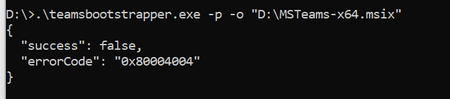
Teams bootstrapper 0x80004004
According to MS documentation: I would like install New Microsoft Teams offline https://learn.microsoft.com/en-us/microsoftteams/new-teams-bulk-install-client Downloaded teamsbootstrapper.exe file...
 Nov 27, 2023
Hi fbatuns,
So I have resolved and deployed New Teams successfully.
I have run script .ps1 with function:
Remove-ItemProperty -Path "HKLM:Software\Wow6432Node\Microsoft\Office\Teams" -Name "maglevInstallationSource"
Tks all Everyone

fbatuns
Nov 27, 2023Iron Contributor
We've had the same Issue. We've solved it by first deprovision the installation with this command:
teamsbootstrapper.exe -x
Followed by
teamsbootstrapper.exe -p -o [Path To MSIX]
teamsbootstrapper.exe -x
Followed by
teamsbootstrapper.exe -p -o [Path To MSIX]
- ThanhNha0903Nov 27, 2023Tin Contributor
Hi fbatuns,
So I have resolved and deployed New Teams successfully.
I have run script .ps1 with function:
Remove-ItemProperty -Path "HKLM:Software\Wow6432Node\Microsoft\Office\Teams" -Name "maglevInstallationSource"
Tks all Everyone
 Mike808Dec 06, 2023Iron ContributorThanks! In my case I had to remove both keys:
Remove-ItemProperty -Path "HKLM:Software\Wow6432Node\Microsoft\Office\Teams" -Name "maglevExitCode"
Remove-ItemProperty -Path "HKLM:Software\Wow6432Node\Microsoft\Office\Teams" -Name "maglevInstallationSource"