Forum Discussion

Setting "Anyone" share link permissions on individual sites in Sharepoint
- Dec 14, 2017
- The script updates the setting only for existing sites.
- Correct.


Salvatore Biscari Hello Again, Mr. Biscari:
I have attempted to run the Powershell script as directed (see attached for mods) and I get a bunch of red (I assume error) feedback from Powershell prior to the closing "External Sharing Capability updated for all sites." message displaying.
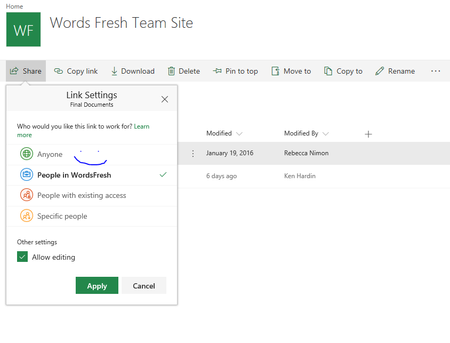
And, predictably, the Anyone Sharing setting has not changed in the Sharepoint interface.
Can you refer us to some source that can handle this task for a fee, etc.? Candidly, we never expected to have to suss out running a script to set a very basic permission such as File Sharing on what is marketed as a SaaS solution, and are simply out of out depth here, I am afraid.
I have attached our edits to the script, in case we have simply made some obvious blunder.
Thanks so much for all your help.
Ken

Ken Hardin Hello,
I was reviewing the error that you received. This is caused by not having the SharePoint Online Management Shell. If you follow this link
https://www.microsoft.com/en-us/download/details.aspx?id=35588 You can install the module which will then accept the Connect-SPOService cmdlet.
The below script is a modified variation of what is found on the previous site:
https://support.office.com/en-us/article/turn-external-sharing-on-or-off-for-sharepoint-online-6288296a-b6b7-4ea4-b4ed-c297bf833e30
- $userCredential = Get-Credential
- Connect-SPOService -Url https://TenantName-admin.sharepoint.com-admin.sharepoint.com -Credential $userCredential
- $sites = Get-SPOSite -Limit ALL -includepersonalsite:$true
- Foreach($site in $sites)
- {
- Set-SPOSite -Identity $site.Url -SharingCapability ExternalUserSharingOnly
- }
- Write-Host("External Sharing Capability updated for all sites.")
This script will need some modification from you.
- The URL section in line 2 will need to be changed to reflect the SharePoint Admin Center URL.
- The portion of line 6 "in italics" will need to be changed to reflect the sharing permission that you want to have enabled for all sites. The sharing permission can be found in the link mentioned above.
NOTE: The Script given will also update the sharing capability of all OneDrive sites as well. The script in the article does not. You can omit the OneDrive for Business from being updated by the script by changing the term in line 3 "-includepersonalsite:$true" from $true to $false.
- MichaelGannottiMay 21, 2021
Microsoft
For this script can you also edit number 3 parameter to be limited to a single site? - Ken HardinApr 09, 2019Copper Contributor
WillinColo Just a quick note ... this has apparently been resolved in the new Admin interface for share point. I was just able to select a new site under Active Sites and set Anyone under the share options.
 WillinColoDec 16, 2018Copper Contributor
Wow! Thank you so much. I didn't know what powershell was until today. I had the same issues as above and this worked to fix it. Felt so good to see that "Anyone" option now selectable.
It's ridiculous that it took this much just to change that option. Microsoft, change this.
EDIT: See Ken Hardin's comment below. Looks like they fixed it. Great news!
