Forum Discussion

claynz
Aug 08, 2025Tin Contributor
Saving Word Files
Everytime I try and save a new Word file to One Drive or even Local PC, I keep getting this message box popping up (Attached) Excel files save ok with message box popping up I have an active Micros...
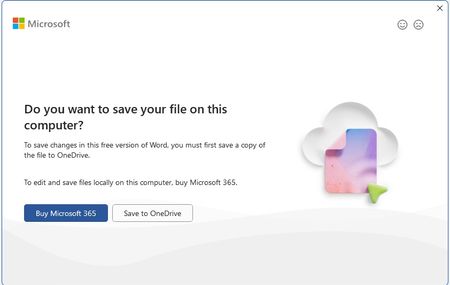

Kidd_Ip
Aug 08, 2025MVP
Below are the possible cause and fix:
- Office Repair
- Go to Settings > Apps > Installed Apps
- Find Microsoft 365, click Modify, then choose Quick Repair (or Online Repair if Quick doesn’t help)
- Save Location Permissions
Check if Word has permission to access your OneDrive or local folders.
- Right-click the folder you're trying to save to → Properties > Security
- Make sure your user account has Write permissions
- Word Add-ins Conflict
Some third-party add-ins can interfere with saving.
- Open Word → File > Options > Add-ins
- At the bottom, choose COM Add-ins > Go
- Uncheck all add-ins and restart Word to test
- Office Updates
- Open Word → File > Account > Update Options > Update Now
- File Naming Issues
Avoid special characters in the file name (e.g., *, ?, /, \)—they can cause save errors.
- OneDrive Sync Issues
- Open the OneDrive app and check for sync errors
- Try saving to a different folder within OneDrive