Forum Discussion

Jeff Parker
Feb 25, 2021Brass Contributor
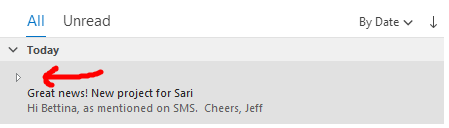
Recipient display name removed and not showing in sent folder
Hi, this unwanted behaviour started about a week or more ago in Outlook. When I construct a new email and enter an addressee, it displays their name, as it used to, but after I send the email, in the...

VasilMichev
Feb 26, 2021MVP
Sorry, what I meant was to run Outlook with the /cleanviews switch, here's a sample article: https://www.slipstick.com/outlook/how-to-use-outlooks-command-line-switches/
You can also try toggling the "Show as Conversations" checkbox and/or play with the conversation settings, hopefully "tickling" them will sort this out.
You can also try toggling the "Show as Conversations" checkbox and/or play with the conversation settings, hopefully "tickling" them will sort this out.

Jeff Parker
Mar 01, 2021Brass Contributor
Thanks Vasil. I tried that, but no luck unfortunately. I also have a Surface Pro with the same Outlook config, and the same problem happens on it.
I just also tried sending an email from Outlook online, and the problem does not happen there.
This is becoming very frustrating. Any thoughts please from anyone as to why this is happening and how to fix it?
I just also tried sending an email from Outlook online, and the problem does not happen there.
This is becoming very frustrating. Any thoughts please from anyone as to why this is happening and how to fix it?