Forum Discussion

Glenn Steinback
Jul 29, 2018Copper Contributor
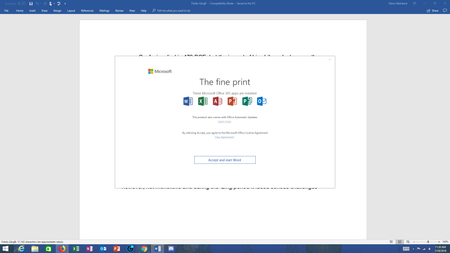
Office 365 "The fine print" popup message - is it legitimate?
Greetings, I have been happily using Office 365 (mostly Word) for many years, and I have never had any problems with any of the products. This morning when I loaded Word I was confronted by a pop...
- Aug 03, 2018


BzByBt
Jul 05, 2019Copper Contributor
I had this problem the last couple of weeks and it was annoying AF. I reached out to Microsoft support desk and they found out it was the Adobe PDF writer office plug in that was the issue.
- Open Word Doc
- Go to File > Options > Add-ins
- Click on the drop down box in "Manage" on the bottom and select "Com Add-Ins"
- Select "Go"
- Uncheck "Acrobat PDFMaker Office COM Addin"
- Click on "Ok"
- Exit out of Word
- Reopen Word and see if the popup shows up
Hope that helps for those having this problem

James Friess
Jul 05, 2019Brass Contributor
I don't have the Adobe add-in, but I still get the annoying pop-up.
That's OK though. I just quit using Microsoft Office. Libre Office works fine.