Forum Discussion

Office 365 Hybrid Migration mailbox


Hi
Well all mailflow test in the portal pass without problems, now I'm trying to validate that with the migrated mailbox and see what happen.
- Edwin CruzOct 10, 2018Brass Contributor
Perform some test with the email flow, for example, when you send an email to a mailbox in O365 when I see the logs I find the mail loops, Exchange 2013 never sen the email to O365 and the Hybrid Configuration passes all test ok.
I don't know what another test or what another change made to complete this
- Edwin CruzSep 19, 2018Brass Contributor
When make a test with my credentials this appear work fine, but when do with the mailbox user this failed, what kind of permissions need to login or somethings need?
- Sep 17, 2018
Hi Edwin Cruz,
The problem you are facing could be several issues. You can start to see the logs in event viewer to see what the user fail's and what is the correct issue in the test.
- Edwin CruzSep 17, 2018Brass Contributor
Hello Nuno
When in the Outlook client make a test connection using the Test Email AutoConfiguration tools if use a user name of the mailbox migrated this display a error authenticated with autodiscover, but when make same test using my credentials this display Successful, what permissions need the users?
- Edwin CruzSep 14, 2018Brass Contributor
ok perfect.
well I migrate one test mailbox to O365 and the outlook client display a message like some change occurred need to restart outlook, when restart the Outlook the client fist appear Connected but few seconds later change to disconnected
- Sep 14, 2018
- Edwin CruzSep 14, 2018Brass Contributor
Nuno
I have two records
https://servername.domain.com/autodiscover/autodiscover.xml
and
https://autodiscover.domain.com.autodiscover/autodiscover.xml
that is the correct configuration or for AutoDiscover only need one host?
- Sep 13, 2018
Hi Edwin Cruz,
I'm glad that you now have completed the HCW, now test everything before migrate real users. Create users migrate, test, test mailflow, outlook, activesync, etc.
- Edwin CruzSep 13, 2018Brass Contributor
YES!, after create another certificate like you told me and make another change in the IIS, this is the result when running the Hybrid Configuration wizard.
now going to test all, I'll tell you the results.
btw. Thank You!! very much for your patience and time.
- Sep 12, 2018
Hi Edwin Cruz,
You will need the same firewall rule in both names to go to your Exchange, and also the same ip to your exchange.
Regarding the certificate, yes you will need also both SAN on the same certificate to work or you can use a wildcard certificate.
- Edwin CruzSep 12, 2018Brass Contributor
ok
when trying this:
https://autodiscover.domain.com/autodiscover/autodiscover.xml
display the page cannot be display
with:
https://servername.domain.com/autodiscover/autodiscover.xml
ask for credentials
changing servername with my server and domain for my host domain
and the testconnectivity website don't work problem with the captcha.
The Certificate for autodiscover need to have the autodiscover.domain.com name or servername.domain.com name like I have to access from O365?
- Sep 12, 2018
Hi Edwin Cruz,
Autodiscover is not the same as OWA, do you have the service published outside, what is the complete result from the Test Exchange Connectivity ?
- Edwin CruzSep 12, 2018Brass Contributor
well I access example the OWA with https
- Sep 10, 2018
Hi Edwin Cruz,
You have your https open to you server that has autodiscover service ?
It seams that something is not well with your https service publication.
- Edwin CruzSep 10, 2018Brass Contributor
hello.
The certificate pass good
but when trying to access example:
https://autodiscover.domain.com/autodiscover.xml say "The page cannot be found"
but when trying access with "HTTP" prompt me for credentials.
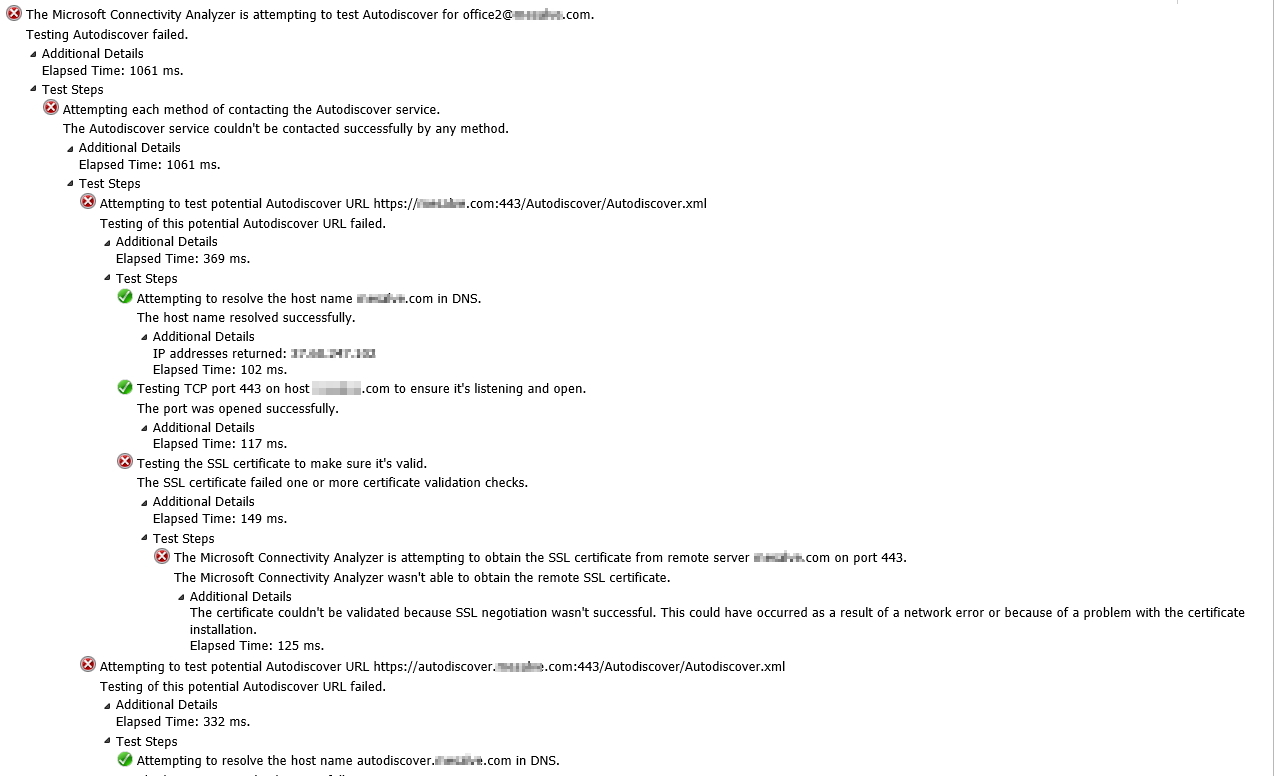
in testconnectivity page the result with error
like this:
- Sep 05, 2018
Hi Edwin Cruz,
You have to test first using http://aka.ms/rca using the Autodiscover Test
You can also test your certificate using SSLShopper
Only after you have your autodiscover working with the certificate correct ti mailflow will work
- Edwin CruzSep 04, 2018Brass Contributor
Hello Nuno.
You know about this error:
HCW8057 error: https:// autodiscover.domain.com/autodiscover/autodiscover.svc
I have a valid certificate installed
- Edwin CruzAug 29, 2018Brass Contributor
I'm working with that, because when run Hybrid Wizard again receive and error HCW8057 error: https:// autodiscover.domain.com/autodiscover/autodiscover.svc
reading about it, is some problem with the certificate, now working on it
- Aug 29, 2018
Hi Edwin Cruz,
Glad to know that the test has passed. Now your mailflow should work. do you have validated ?