Forum Discussion

chrissykenny
Oct 30, 2023Copper Contributor
New Templates
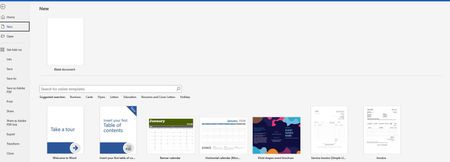
Hi, I have several templates that I use and wanted to know if it would be possible to add these to the menu below under New and if so would it be possible to make it show in all users in my organ...

JosvanderVaart
Oct 30, 2023Iron Contributor
You can do this using Powershell and a SharePoint Documents library. Here is an example:
Add-SPOOrgAssetsLibrary -LibraryUrl https://<tenant>.sharepoint.com/sites/assets/templates -OrgAssetType OfficeTemplateLibrary -CdnType Private
Please click Mark as Best Response & Like if my post helped you to solve your issue.
This will help others to find the correct solution easily. It also closes the item.
If the post was useful in other ways, please consider giving it Like.
Kindest regards,
Add-SPOOrgAssetsLibrary -LibraryUrl https://<tenant>.sharepoint.com/sites/assets/templates -OrgAssetType OfficeTemplateLibrary -CdnType Private
Please click Mark as Best Response & Like if my post helped you to solve your issue.
This will help others to find the correct solution easily. It also closes the item.
If the post was useful in other ways, please consider giving it Like.
Kindest regards,

chrissykenny
Oct 30, 2023Copper Contributor
JosvanderVaart - Thanks so much for your prompt reply but when I click on the link it is not doing anything for me 😞
- JosvanderVaartOct 30, 2023Iron ContributorIt's a powershell command you can run, if you change the URL to the SharePoint location where your templates are located they should appear in the office applications