Forum Discussion

Authentication Failure for IMAP and POP3 using Client Credential flow for OAuth2.0 | Java
 Jul 29, 2022
Hi. I had the same problem, but I think I made some progress.
I read documentation few times, tried few times from the start with same error. I even have tried using client and object ids instead of email as username, in lack of better ideas.
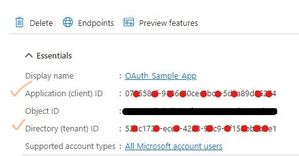
So this is where I think I have made mistake previous times.When you are at the part that you need to register service principal, you need to execute
New-ServicePrincipal -AppId <APPLICATION_ID> -ServiceId <OBJECT_ID> [-Organization <ORGANIZATION_ID>]here I put enterprise application object id as ServiceId argument. And that is ok.
But on
Add-MailboxPermission -Identity "email address removed for privacy reasons" -User
<SERVICE_PRINCIPAL_ID> -AccessRights FullAccess
I have put my registered application object id as User argument. I also tried setting object id of enterprise application, but it did not have success.
I also tried New-ServicePrincipal but with registered app object id as service id, but it gave me the same result.
When I executed
Get-ServicePrincipal -Organization <ORGANIZATION_ID> | flI did not pay attention to ServiceId property, even with documentation specifying it and saying it will be different.
Now I cleared everything and started fresh.
I executed all the steps again, but on the step when I need to add mail permission, I list service principals, and then use `ServiceId` value from the output, as argument for user.
With that, I was able to authorise.
Unfortunately, now I receive `C3 BAD User is authenticated but not connected.` when I try to list inbox. But it is step forward.
I am not sure if you made the same error as me, but maybe it will help you in some way.
I will post info, when I find fix for the new error if somebody comes across same issue.


shrey_soni I have attached the java code link above as "https://ideone.com/2RaWN9" where you can easily find the java code which I used during implementation. Or else, you can import the project directly to your local by from https://github.com/Azure-Samples/ms-identity-msal-java-samples/tree/main/1.%20Server-Side%20Scenarios/msal-client-credential-secret.
Apart from that I have followed the steps mentioned in "https://docs.microsoft.com/en-us/exchange/client-developer/legacy-protocols/how-to-authenticate-an-imap-pop-smtp-application-by-using-oauth#get-an-access-token"
Must check the answer in this thread which I have marked as best response before running the cmdlets
 Deepak0523Sep 28, 2022Copper Contributor
Hi please help on pop3 oauth flow, getting protocol error connection failed ,any help will be appreciated.