Forum Discussion

Authentication Failure for IMAP and POP3 using Client Credential flow for OAuth2.0 | Java
 Jul 29, 2022
Hi. I had the same problem, but I think I made some progress.
I read documentation few times, tried few times from the start with same error. I even have tried using client and object ids instead of email as username, in lack of better ideas.
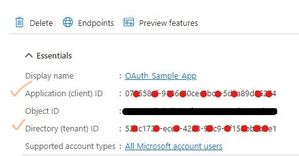
So this is where I think I have made mistake previous times.When you are at the part that you need to register service principal, you need to execute
New-ServicePrincipal -AppId <APPLICATION_ID> -ServiceId <OBJECT_ID> [-Organization <ORGANIZATION_ID>]here I put enterprise application object id as ServiceId argument. And that is ok.
But on
Add-MailboxPermission -Identity "email address removed for privacy reasons" -User
<SERVICE_PRINCIPAL_ID> -AccessRights FullAccess
I have put my registered application object id as User argument. I also tried setting object id of enterprise application, but it did not have success.
I also tried New-ServicePrincipal but with registered app object id as service id, but it gave me the same result.
When I executed
Get-ServicePrincipal -Organization <ORGANIZATION_ID> | flI did not pay attention to ServiceId property, even with documentation specifying it and saying it will be different.
Now I cleared everything and started fresh.
I executed all the steps again, but on the step when I need to add mail permission, I list service principals, and then use `ServiceId` value from the output, as argument for user.
With that, I was able to authorise.
Unfortunately, now I receive `C3 BAD User is authenticated but not connected.` when I try to list inbox. But it is step forward.
I am not sure if you made the same error as me, but maybe it will help you in some way.
I will post info, when I find fix for the new error if somebody comes across same issue.
But I used ObjectId from Enterprise Application View, instead of App Registration view.
I used that object ID for creating new principal and for adding mail box permission.
I will retry everything again, to be sure and I will get back to you.

borist2 Thank you for pointing out this clue where we need to use OBJECT ID from the Enterprise application view in all the cmdlets i.e. New-ServicePrincipal, Get-ServicePrincipal and Add-MailboxPermission.
It is finally working fine (only for IMAP flow) for me after trying out the same set of steps on a new application, keeping in mind that I have to use OBJECT ID value from Enterprise Application view.
But still there is some issue while trying to connect with this application for POP3 flow.
As per my understanding, following is the list of parameters used while performing Service Principal related queries:
(Please correct me if I am wrong)
Parameters used (and where to find them):
- appId: Application (client) ID [ found in Application Overview screen, from both Enterprise and App reg]
- entObjId: Object ID(Enterprise app) [ found in Enterprise Application Overview screen only ]
- orgId: Directory (tenant) ID [ found in Azure AD overview screen ]
Commands:
- New-ServicePrincipal -AppId appId -ServiceId entObjId -Organization orgId
- Get-ServicePrincipal -Organization entObjId | fl
- Add-MailboxPermission -Identity "<email_id_here>" -User entObjId -AccessRights FullAccess
Confusions:
- In Add-MailboxPermission cmdlet, <SERVICE_PRINCIPAL_ID> creates confusion, because in order to apply permissions like "IMAP.AccessAsApp", the internet tells that "Service Principal ID" can be found at [ Azure AD -> Enterprise Application -> (chosen application) -> Permissions -> IMAP.AccessAsApp -> use the Service Principal ID from Flyout menu ]
- Enterprise Object ID can be used in place of Organization ID in all 3 cmdlets
jambo Anjitha170 DestryHines Thanks for your suggestions and findings on this issue that I have raised.
However I am still unable to establish a connection through the POP3 protocol, and I want to do it just like we did it for IMAP. Below is the error log for the issue I am facing while trying to connect with POP3. Any help and suggestions will be much appreciated.
*** pop3 ***
DEBUG: JavaMail version 1.5.5
DEBUG: successfully loaded resource: /META-INF/javamail.default.providers
DEBUG: Tables of loaded providers
DEBUG: Providers Listed By Class Name: {com.sun.mail.smtp.SMTPSSLTransport=javax.mail.Provider[TRANSPORT,smtps,com.sun.mail.smtp.SMTPSSLTransport,Oracle], com.sun.mail.smtp.SMTPTransport=javax.mail.Provider[TRANSPORT,smtp,com.sun.mail.smtp.SMTPTransport,Oracle], com.sun.mail.imap.IMAPSSLStore=javax.mail.Provider[STORE,imaps,com.sun.mail.imap.IMAPSSLStore,Oracle], com.sun.mail.pop3.POP3SSLStore=javax.mail.Provider[STORE,pop3s,com.sun.mail.pop3.POP3SSLStore,Oracle], com.sun.mail.imap.IMAPStore=javax.mail.Provider[STORE,imap,com.sun.mail.imap.IMAPStore,Oracle], com.sun.mail.pop3.POP3Store=javax.mail.Provider[STORE,pop3,com.sun.mail.pop3.POP3Store,Oracle]}
DEBUG: Providers Listed By Protocol: {imaps=javax.mail.Provider[STORE,imaps,com.sun.mail.imap.IMAPSSLStore,Oracle], imap=javax.mail.Provider[STORE,imap,com.sun.mail.imap.IMAPStore,Oracle], smtps=javax.mail.Provider[TRANSPORT,smtps,com.sun.mail.smtp.SMTPSSLTransport,Oracle], pop3=javax.mail.Provider[STORE,pop3,com.sun.mail.pop3.POP3Store,Oracle], pop3s=javax.mail.Provider[STORE,pop3s,com.sun.mail.pop3.POP3SSLStore,Oracle], smtp=javax.mail.Provider[TRANSPORT,smtp,com.sun.mail.smtp.SMTPTransport,Oracle]}
DEBUG: successfully loaded resource: /META-INF/javamail.default.address.map
DEBUG: setDebug: JavaMail version 1.5.5
DEBUG: getProvider() returning javax.mail.Provider[STORE,pop3,com.sun.mail.pop3.POP3Store,Oracle]
DEBUG POP3: mail.pop3.rsetbeforequit: false
DEBUG POP3: mail.pop3.disabletop: false
DEBUG POP3: mail.pop3.forgettopheaders: true
DEBUG POP3: mail.pop3.cachewriteto: false
DEBUG POP3: mail.pop3.filecache.enable: false
DEBUG POP3: mail.pop3.keepmessagecontent: false
DEBUG POP3: mail.pop3.starttls.enable: true
DEBUG POP3: mail.pop3.starttls.required: false
DEBUG POP3: mail.pop3.apop.enable: false
DEBUG POP3: mail.pop3.disablecapa: false
DEBUG POP3: connecting to host "outlook.office365.com", port 995, isSSL false
+OK The Microsoft Exchange POP3 service is ready. [TQBBAFgAUABSADAAMQAwADEAQwBBAD...==]
CAPA
+OK
TOP
UIDL
SASL PLAIN XOAUTH2
USER
.
DEBUG POP3: authentication command trace suppressed
DEBUG POP3: authentication command failed
QUIT
<EOF>
javax.mail.AuthenticationFailedException: Protocol error. Connection is closed. 10
at com.sun.mail.pop3.POP3Store.protocolConnect(POP3Store.java:209)
at javax.mail.Service.connect(Service.java:366)
at javax.mail.Service.connect(Service.java:246)
at test.ClientCredentialGrant.connectPOP(ClientCredentialGrant.java:242)
at test.ClientCredentialGrant.main(ClientCredentialGrant.java:53)
- LinaMM2022Oct 19, 2022Copper Contributorkirill247742. I think you're mixing functionalities.
This is not Microsoft graph. Look at the documentation shared in this thread, because you need to create an application in order to make everything.
If you want to use Microsoft Graph is a complete different implementation.  kirill247742Oct 19, 2022Copper ContributorThanks, LinaMM2022 for the help!
Well, I don't see any library conflict and the token is correct. As for permissions in Azure for POP3, I'm not sure.
Now I have 6 of them:
Microsoft Graph (6)
- email
- IMAP.AccessAsUser.All
- offline_access
- POP.AccessAsUser.All
- SMTP.Send
- User.Read
Did I miss something important?- LinaMM2022Oct 19, 2022Copper ContributorHi kirill247742.
Well, it should be working with those parameteres. Maybe you should confirme that your fonts are indeed using jakarta and you don't have maybe library conflict.
Apart from that, make sure you're using the token (not the password from account) and have all the permissions in Azure for POP3. - kirill247742Oct 19, 2022Copper ContributorHi LinaMM2022
Thanks for the advice, at least the error is already different)
Maybe you have encountered a similar error and can tell how to solve it
DEBUG POP3: AUTH XOAUTH2 using two line authentication format
DEBUG POP3: AUTH XOAUTH2 failed
Authentication failure: unknow user name or bad password
I am sure the data is correct. Perhaps I missed some access? Or something else.. - LinaMM2022Oct 18, 2022Copper Contributor
Hi kirill247742.
The most important property for me was (And according to your log you're not using it):
properties.put("mail.pop3s.auth.xoauth2.two.line.authentication.format", "true");
Apart from that, properties were basically the same from IMAP:
"mail.pop3s.auth.mechanisms", "XOAUTH2"
"mail.pop3.ssl.enable", "true"
- kirill247742Oct 18, 2022Copper ContributorHi LinaMM2022
I have a similar problem with POP3, and when I installed jakarta.mail 1.6.7 problem still exists. Did you do anything else?
I have this debug text:
DEBUG POP3: Attempt to authenticate using mechanisms: XOAUTH2
DEBUG POP3: Using mechanism XOAUTH2
DEBUG POP3: AUTH XOAUTH2 command trace suppressed
DEBUG POP3: mail.pop3s.auth.xoath2.two.line.authentication.format: false
DEBUG POP3: AUTH XOAUTH2 using one line authentication format
DEBUG POP3: AUTH XOAUTH2 failed - manish1614Sep 08, 2022Brass Contributor
LinaMM2022 Thank you for suggesting this change, but for my case we are currently moving forward with only IMAP based connections because there were other modules in my product which highly depends on the JavaMail jar.
In case if we plan to implement POP3, we would definitely try to connect using the Jakarta Mail api.Thanks alot.
- LinaMM2022Sep 07, 2022Copper Contributor
Hi manish1614
I had a similar problem with POP3 with the latest version of javax.mail (1.6.2)
However, I was looking at the documentation and the project move to jakarta mail. I replaced project dependency with jakarta.mail 1.6.7 and POP3 started to work.
Hopefully it can worked for you as well.
- manish1614Aug 03, 2022Brass ContributorI have been using JavaMail jar 1.5.5 all this time, so I tried to update it to 1.6.2(latest).
I have checked the msal4j jar, which have version 1.12.0(released on May 06, 2022), seems fine.
Post updating the jars I ran the flow for POP3 connection again, but didn't got any success till now.
In some posts they say that we need to add the scope as "https://outlook.office.com/POP.AccessAsUser.All" explicitly in the code, but never tell how or where to specify it exactly.
As per my findings, the only valid scope value is "https://outlook.office365.com/.default"  DestryHinesAug 03, 2022Copper ContributorI'm not using Java but I'm having a similar problem in PHP using a third-party library called PHPMailer with SMTP now. I think most implementations didn't properly support client_crendentials for the grant type because Microsoft didn't have it working properly. You may need to get an updated version or figure out in your Java code how it's handling the oAuth grant type and update the code until there's an update.
- manish1614Aug 03, 2022Brass Contributor
DestryHines Thanks for pointing this out. For me, this command is executed internally from the JavaMail library functions. After reviewing your comment I tried to split the command into 2 lines using the property, "mail.pop3.auth.xoauth2.two.line.authentication.format" as true
Reference was taken from https://javadoc.io/static/com.sun.mail/jakarta.mail/2.0.1/jakarta.mail/com/sun/mail/pop3/package-summary.html
But I am still unable to establish a connection with POP3 protocol. And getting the same error message.
Note: Updated the POP3 code in this post jambo Thank you for suggesting me to apply this property. I have tried to implement it in my existing code but I haven't got any success in establishing a connection through POP3.
Apart from this property, I tried setting:-
- mail.pop3.auth.xoauth2.disable as false
- mail.pop3.auth.mechanisms as XOAUTH2
- mail.pop3.starttls.enable as true
Please let me know if any other parameters are required, or an existing parameter needs to be removed.
- jamboAug 02, 2022Brass Contributor
I read somewhere you to need add the following the session. Not sure if that will help.
props.put("mail.pop3.auth.xoauth2.two.line.authentication.format", "true"); - DestryHinesAug 02, 2022Copper Contributor
It seems like your POP3 authentication command is incorrect?
The https://docs.microsoft.com/en-us/exchange/client-developer/legacy-protocols/how-to-authenticate-an-imap-pop-smtp-application-by-using-oauth says to use:
AUTH XOAUTH2
<base64 string in XOAUTH2 format>
For example:
[connection begins]
C: AUTH XOAUTH2
S: +
C: dXNlcj1zb21ldXNlckBleGFtcGxlLmNvbQFhdXRoPUJlYX
JlciB5YTI5LnZGOWRmdDRxbVRjMk52YjNSbGNrQmhkSFJoZG1semRHRXVZMjl0
Q2cBAQ==
S: +OK User successfully authenticated.
[connection continues...]