Forum Discussion

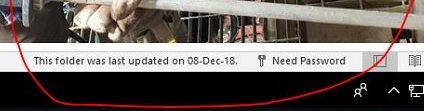
Outlook (365) Need Password - Issue
- Dec 13, 2018Hi Muhammed,
Add the Registry key as advised in the article
We've been seeing this for more than 6 months sporadically and again same for one computer today. There was no recent password change but suddenly behavior as described here. Adding this key and setting it to 1 fixed the issue with no reboot. We're seeing this reported by a very small number (half or a quarter percent maybe?) of the clients that we manage.
Best, Chris


Hello all!
I'm hoping my experience in this may help someone with something they may not have thought of...
July 10 2023 was the start of my hell period - started with one user being challenged for MS Password out of the blue - then one by one most of the organization started getting the popups almost every day or every other day. The sad part was that a small portion of our users started getting the dreaded "Outlook Loop" following by "Need Password" as the condition message (causing all Microsoft Products to fail by the way - including Teams and OneDrive.)
Opened about 4 trouble tickets with Microsoft during this period, with little or no solutions until the last agent, who was in contact with more senior support staff, asked what AV solution our organization uses. This location uses Trend Worry Free AV (Client/Server), and they suggested I "try it without Antivirus" - I initially balked as NOTHING changed in that area and couldn't have been caused by that but as a IT Tech myself I knew it was good practice to rule it out. We removed our corporate AV solution on 1 test machine with severe restrictions on usage and wouldn't you know it, all the problems went away! I was shocked - again NOTHING changed in our AV - no patches, no updates apart from the pattern files. (There were also no scheduled Windows update either - however the Microsoft Office Product offering is set to automatically install updates) The agent added that they have documented reports with customers with our same setup and the issue was the Antivirus. So Pass the buck time... I opened a case with the AV provider and in short order they had reports of this same issue as far back as May 2023 - they stressed that the problem is not just with their AV product but that it has been reported WITHOUT ANY aftermarket AV Solution! (implying Microsoft) Anyway for ANYONE that is curious what OUR solution was here is a synopsis of the Changes to OUR ANTIVIRUS SOFTWARE - Trend Micro:
I. Under Real-Time Scan / Scheduled Scan / Manual Scan> click +Add
Under directories in the Folders tab:
-----------------------------------------------------------
C:\Users\*\AppData\Local\Packages\Microsoft.AAD.BrokerPlugin_cw5n1h2txyewy*
C:\Windows\SystemApps\Microsoft.AAD.BrokerPlugin_cw5n1h2txyewy*
C:\Windows\SystemApps\Microsoft.Windows.ContentDeliveryManager_cw5n1h2txyewy
C:\Users\*\AppData\Local\Packages\Microsoft.Windows.ContentDeliveryManager_cw5n1h2txyewy
-----------------------------------------------------------
Antivirus/Antispyware, under files tab:
-----------------------------------------------------------
C:\Windows\SystemApps\Microsoft.AAD.BrokerPlugin_cw5n1h2txyewy\Microsoft.AAD.BrokerPlugin.exe
II. Under the Behavior Monitoring Approved List:
-----------------------------------------------------------
C:\Windows\SystemApps\Microsoft.AAD.BrokerPlugin_cw5n1h2txyewy\Microsoft.AAD.BrokerPlugin.exe
C:\Users\*\AppData\Local\Packages\Microsoft.AAD.BrokerPlugin_cw5n1h2txyewy*
-----------------------------------------------------------
III. For Trusted Program List:
Trusted Program List > Add program full path
---------------------------------------------------------------------------------------------------
C:\Windows\SystemApps\Microsoft.AAD.BrokerPlugin_cw5n1h2txyewy\Microsoft.AAD.BrokerPlugin.exe
---------------------------------------------------------------------------------------------------
I can imagine the headaches out there after reading all your reports -
Thought I'd add this avenue in case it helps someone out there.
Good Luck!
 DeletedOct 24, 2023Not applicableIn Summer 2023 it also started in our case. Thank you verry much for sharing your solution, it solved the problem completely.
I added the exclusions in out av solution (even though it hasn't detected anything in that folder) and deleted "C:\Users\<username>\AppData\Local\Packages\Microsoft.AAD.BrokerPlugin_cw5n1h2txyewy" for every user that had this problem. After that, outlook asks for the password one time and works just as it should. _WingMan_Oct 26, 2023Copper Contributor
I have been working on this problem for almost a year now and going through some of the possible solutions found here including yours. Thankfully I came across this thread and was able to show my clients that it is indeed an issue that many are struggling with. My main client experiencing this, the issue occurs sporadically. He will run fine for a week... even two or three and then boom, he opens outlook and at the bottom, it says it is not connected to exchange and that it "Needs Password" yet we don't have the ability to enter a password. The quick solution is a complete system reboot and he is back up for maybe another week or two. I have applied this suggestion (removing \microsoft.aad.brokerplugin) today. I'll know in a few weeks if it worked or not.
 BEBakerOct 26, 2023Brass ContributorThank you. I have tried so many things with the tech reps and nothing has worked permanently. I look forward to hearing if your solution works long term.