Forum Discussion

Muhammad Ali Khan
Dec 10, 2018Copper Contributor
Outlook (365) Need Password - Issue
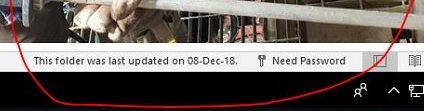
Hi, We are using E3, outlook 365 in our company. Some of our users' outlook stop sync with exchange and ask for password, as shown in below image: to fix the issue, I clear entries i...
- Dec 13, 2018Hi Muhammed,
Add the Registry key as advised in the article
We've been seeing this for more than 6 months sporadically and again same for one computer today. There was no recent password change but suddenly behavior as described here. Adding this key and setting it to 1 fixed the issue with no reboot. We're seeing this reported by a very small number (half or a quarter percent maybe?) of the clients that we manage.
Best, Chris


SeansPCPowerIT_Service
Mar 20, 2022Copper Contributor
The solution I found for this problem that worked for me was to uninstall 365 and install Microsoft Office Professional Plus 2019. I logged into my personal account, setup email and it has so far worked without an issue. I am thinking the issue was to do with 365 Business Standard edition and I was signed in with a work or school account. I logged out of that account and uninstalled 365. Installed the Office pro plus and logged in with my personal account. My Exchange email account was setup through GoDaddy as they are my domain host and registrar. I think this issue is different for everyone else. Unfortunately Microsoft is so large they don't know what is going on and are unable to resolve their own software issue.

BEBaker
Mar 20, 2022Brass Contributor
Thank you. We have uninstalled Microsoft 365 and reinstalled the current version and yet to no avail in my scenario. We modified the registry numerous times, recreated Outlook profiles, recreated Windows profiles, fiddled with TFA, credential manager, Teams Organizations, and nothing has been a permanent fix. The best solution is rebooting, and then all is good for about 36 hours when out of the blue, it will stop working because it needs the password. When you click on the error notification (in the lower right-hand area of Outlook), the password dialogue box pops up for a nanosecond, and there is nothing to do but reboot.