Forum Discussion

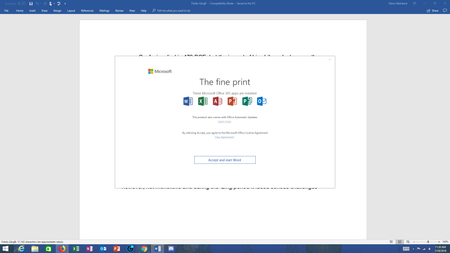
Office 365 "The fine print" popup message - is it legitimate?
- Aug 03, 2018


Damien,
I don't think you are following me. I DID opt to buy Microsoft Office 2016 instead of Office 365 for exactly this reason! I paid extra so that I would not be subject to the changing licensing. I paid full price to own this office suite and now am being denied access to it.
The worst part is the doctor in our office who uses outlook to manage email. She has now lost access to all her correspondence! One colleague in Japan went ahead and hit accept and was aghast when his computer began downloading something.
I imagine that tomorrow, there will be widespread outrage.
 Eric NorgrenOct 26, 2018Copper Contributor
Solved, my first option or angle of attack was to disable the Office Updates, the second Randy helped me out with though I would've assumed the same same 2nd process, which was to run Office Repair after disabling the Office Updates so it could overwrite any changed files with the originals. This should get rid of those 365 popups in previous versions of Office.
Loren Balk wrote:OK. I've read through all the messages in this thread. I am among the group that is using Office 2016 Professional Plus NOT office 365. I have two computers, a desktop and a Surface Pro. I am only have problems with my Surface Pro and I have detected differences between the OS build numbers on the two computers.
Desktop - OS Build 17134.191 - works, no problems
Surface Pro 4 - OS Build 17134.165 - I get the "The Fine Print" dialog
.191 works
.165 does not work.
I wonder if this is significant.
- Eric NorgrenOct 26, 2018Copper Contributor
Solved, my first option or angle of attack was to disable the Office Updates, the second Randy helped me out with though I would've assumed the same same 2nd process, which was to run Office Repair after disabling the Office Updates so it could overwrite any changed files with the originals. This should get rid of those 365 popups in previous versions of Office.
- wrootAug 02, 2018Silver Contributor
Office 2016 Pro (non Office 365) is also a CTR version, which is updating on its own from the Office updates servers, same as Office 365 version. I guess they received the same update.
I don't think OS version is important here. I have received same popup on Windows 7, which got an Update Rollup this week and a user saw popup on Windows 10, which hasn't had an update recently (we control it via WSUS). Unless this was done with the regular July updates. But i doubt Windows update could change the place of Office EULA agreement storage. To test that you can manually run check for updates in Office and make sure versions are the same (File > Account).
It might be that some of your clients haven't received the update yet. When update is released Office can wait for a week or so before pulling it and installing (there is probably some random delay and it also waits for the user not to use his/her PC actively).
- Damien_RosarioAug 02, 2018Silver Contributor
Hi Loren Balk
As wroot has found earlier on (great find and info Oleg), Microsoft have released an advisory about an issue where an update has moved the EULA for the software to another location (EULA has not been modified) causing the prompt.
I suspect when your Windows Update did its thing, it installed said update which cause the issue.
While Microsoft is a big company, they are human and don't always get it right. I'm personally inclined to give them the benefit of the doubt on this one as we all make mistakes. I doubt they turn up to work everyday thinking of new and exciting ways to mess with its user base :)
And to the question of whether Microsoft will answer us on this issue, Deleted and the other community managers are working to get something from that department to provide a response. It's a big company, I'm sure they have protocols to follow.
At least from the advisory alert that it reads that this pop-up isn't a virus so it isn't Skynet trying to infect the Internet in preparation for Judgement day (always a good thing).
Happy Friday to you all! Wishing you a terrific weekend ahead!
Cheers
Damien
- Loren BalkAug 02, 2018Copper Contributor
OK. I've read through all the messages in this thread. I am among the group that is using Office 2016 Professional Plus NOT office 365. I have two computers, a desktop and a Surface Pro. I am only have problems with my Surface Pro and I have detected differences between the OS build numbers on the two computers.
Desktop - OS Build 17134.191 - works, no problems
Surface Pro 4 - OS Build 17134.165 - I get the "The Fine Print" dialog
.191 works
.165 does not work.
I wonder if this is significant.
 karenleebethesdaAug 02, 2018Copper Contributor
Oleg, thanks, didn't realize that.
I thought it better to check here, than to open a support ticket for a known issue. And, other comments didn't indicate an exceptional experience with support on this topic. :)
The reason I'm being so cautious is that, years ago, my then-new pc got ransomware. I now use the paid version of Malwarebytes antimalware, but I'm still skeptical about unexpected popup msgs.
I see there are other discussion threads related to this one, where folks are telling each other that the popup just indicates that the most recent updates applied, require new 'fine print' for the user to sign. That's demonstrably incorrect, and your explanation is still the best I've seen. ty.
- wrootAug 02, 2018Silver Contributor
Honestly, i doubt you will get official reaponse here. If you need that, file a support ticket and ask them to provide you one.
Office is not always updating on the same day everywhere (sometimes it takes a week or longer), it can be that update was released on July 28, but your client updated later. Mine hasn't updated until i ran update check manually yesterday and got the same popup. That confirmed my theory of faulty update and not malware.
- wrootAug 02, 2018Silver Contributor
I don't know of a public link to this information. I took it from our Admin center of Office 365. Im not an MS representative. Just a user like you, or more specifically IT admin at organization using Office 365.
- karenleebethesdaAug 02, 2018Copper Contributor
Oleg, thanks so much for tracking this down!
While I had noticed that the license agreement text said 'last updated September 2017', I was concerned at the possibility of malware concealed by an apparently legitimate page of content.
I even verify updates to products from Adobe and Malwarebytes, when they pop up, out of an overabundance of caution. :)
Thanks!
eta: after reading others' replies, I'd also like to see an official communication from Microsoft.
The screen image in Oleg's reply appears to be from the Office 365 admin portal, so presumably another Office 365 administrator can verify its provenance....
- PETER FARENWALDAug 02, 2018Copper Contributor
Hello Oleg K,
You have provided some information that you say is from a Microsoft advisory.. No offense, but I still would prefer to see a Microsoft response to this.
Can you provide a link to the Microsoft website that contains this information ?
For one thing, you listed "Start time: Saturday, July 28, 2018, at 2:00 PM UTC", but I was using Office 2016 applications without issue on Monday July 30. I didn't see the popup until Tuesday July 31.
When is Microsoft going to respond to this matter ?
Does Oleg K represent and speak on behalf of Microsoft ?
 Martin KimzeyAug 02, 2018Copper Contributor
Completely agree - incidents such as this and the Windows 10 1803 BSOD update have all but destroyed my confidence in Microsoft. Microsoft has a very real and serious credibility problem.
- James FriessAug 02, 2018Brass Contributor
Mark Tompkins wrote:In important ways, it is "malware" -- it is inadequately sourced, so it could be "spoof'ed"...
The behavior is clearly wrong -- i.e. prompting for accepting a license that has already been accepted...
... and, even if it is Microsoft's mistake, there is no way to determine that it is harmless without triggering unknown events... (so, for example, it is entirely possible that it would be "accepting" additional activities that a user did not want...)
Thus, users should not be clicking on something like this... it should only be happening at an install sequence...
Mark Tompkins wrote:In important ways, it is "malware" -- it is inadequately sourced, so it could be "spoof'ed"...
The behavior is clearly wrong -- i.e. prompting for accepting a license that has already been accepted...
... and, even if it is Microsoft's mistake, there is no way to determine that it is harmless without triggering unknown events... (so, for example, it is entirely possible that it would be "accepting" additional activities that a user did not want...)
Thus, users should not be clicking on something like this... it should only be happening at an install sequence...
I heartily agree! I was a little shocked at an earlier post that read, in part, "It is OK to Accept. My version of the Agreement really didn't say anything....it didn't look like the standard Microsoft agreement. "
This is not normal behavior for a product that was installed months or years ago. Simply clicking "Accept" in boxes that pop up out of nowhere is a recipe for disaster.
 Mark TompkinsAug 02, 2018Brass Contributor
In important ways, it is "malware" -- it is inadequately sourced, so it could be "spoof'ed"...
The behavior is clearly wrong -- i.e. prompting for accepting a license that has already been accepted...
... and, even if it is Microsoft's mistake, there is no way to determine that it is harmless without triggering unknown events... (so, for example, it is entirely possible that it would be "accepting" additional activities that a user did not want...)
Thus, users should not be clicking on something like this... it should only be happening at an install sequence...
- wrootAug 02, 2018Silver Contributor
That's the detailed information from advisory:
Title: Issues accessing Office Online User Impact: Users may receive an unexpected pop-up regarding the license agreement and may also be unable to access Office clients.
More info: When users receive the pop-up regarding the End User Licensing Agreement (EULA), clicking "Accept" should enable access to Office clients. Dismissing the pop-up may result in Office clients closing. The content of the licensing agreement has not changed.
Current status: We've identified that a recent feature update has modified the storage location of the EULA acceptance information and is causing users to receive a pop-up message prompting them to accept the user agreement. We've initiated the process of reverting this update to mitigate impact.
Scope of impact: This issue may potentially affect any of your users attempting to access Office clients. Start time: Saturday, July 28, 2018, at 2:00 PM UTC
So it was a technical bug which caused for the same EULA agreement which is shown when activating new product to be shown to existing users/installations. It is saying they are now reverting the faulting update.
- Martin KimzeyAug 02, 2018Copper Contributor
I'm starting to wonder if it would be useful to get an attorney involved.
- wrootAug 02, 2018Silver Contributor
It is not mentioning malware because it is not a malware. One can click on the advisory to read details. I haven't read the details. It was enough to email my users to click Accept when it appears after Office updates. In our case it doesn't come up again and is not blocking Office usage. Have more pressing issues than a simple license agreement popup..
- Susan WebeckAug 02, 2018Copper Contributor
I just clicked on a Word doc and it opened without any issues. No pop-up, no muss no fuss. Fingers crossed?
I also note that Microsoft's acknowledgement, above, acknowledges only the problem--it does not tell us whether it/is/was a MS issue or potentially malware. It's good to see progress, but it gives us no guidance.
And Microsoft's Virtual Agent is STILL working on connecting me to a live agent . . .
- Garry RawlinsAug 02, 2018Iron Contributor
But you could say the same of Apple (Jobs and Gates took the graphical OS idea from Xerox) and any other organisation that creates an ecosystem that you are joining ... this behaviour is not Microsoft specific and inherent to the SaaS model across the globe. Just to be clear I'm not defending this activity ..
 Walter ElliottAug 01, 2018Copper ContributorJames;
Thanks for the info on LibreOffice. Researched it. Probably going to download and set it up on a test box. We also have a mix of MS Office products, going back to Office 2007. Only the new Office is getting the message and only those that get their MS updates automatically. Thanks again.- James FriessAug 01, 2018Brass ContributorWe refused to accept this revised agreement and just downloaded LibreOffice. Fortunately, only one user was affected and she seems more than happy to simply use webmail and LibreOffice. All our other computers are on Office 2010 and 2013. They continue to work just fine.
- Walter ElliottAug 01, 2018Copper Contributor
James;
I do not agree with Microsoft's coercive behavior. I loathe the way they just do whatever they want and push out sub-standard software and then leave us without support. My personal philosophy is that Mr. Gates was never an OS genius but a marketing genius. However, being responsible for a company full of desktops and just wanting the users to continue working means that I have to accept things the way they are. I guess we could all explore alternative software but it might be a little late for that. I am just grateful that this time, at least, it wasn't some malware trying to destroy us. I am also grateful for one resource left to us, namely blogs like this one.
- James FriessAug 01, 2018Brass Contributor
Did you read the new EULA?
Did you knowingly agree to allow Microsoft gather data on you?
Was that part of the EULA that you originally accepted?
Do you think it is acceptable for Microsoft to change the terms of the EULA retroactively?
Do you think it acceptable for Microsoft to deny you access to the software you bought from them if you object to this retroactive change?
- Walter ElliottAug 01, 2018Copper Contributor
For Office 2016, I have accepted the pop-up message on a user's desktop and I regained access to the Office 2016 programs and all documents and worksheets. I did not get any downloads and the machine scanned clean. It looks as if your assessment was correct. I will monitor that machine for a bit and if nothing happens, I will accept the message on the rest of the shop. However, I do understand the drama, in fact, I was recommending that our users not accept the message.
- Damien_RosarioJul 31, 2018Silver ContributorHi James
Sounds nasty but Eric Starker is on the case so I'm looking forward to hearing the details as we all are!
When you say the Doctor has lost all correspondence (not ideal), is that because she didn't hit Accept? Are the correspondences still in webmail?
Hope she gets back online soon. Being disconnected from things in todays world is very uncomfortable!
Cheers
Damien

