Forum Discussion

New app launcher in edge
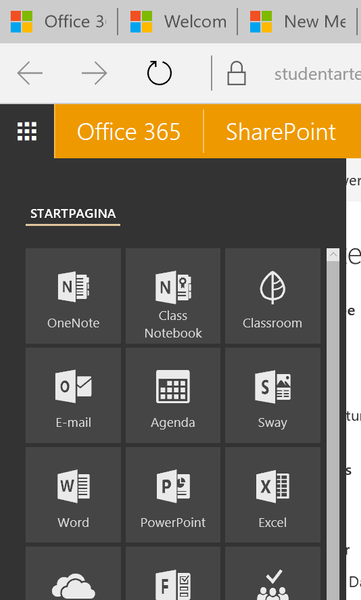
- Dec 04, 2016
Haniel_Croitoru wrote:Hi bart_vermeersch,
My tenant is giving me the same problem in Edge. I checked other browsers and found that IE doesn't show the other tabs either, but Chrome and Firefox do.
What I found was that when you click the Get more apps link at the bottom, the other tabs appear. It seems to be a glitch in Edge/IE.
Hope this helps.
It is a bit of the same as with the old menu: you actually need to start webmail (Outlook Online) to have the menu work properly. The menu is properly loaded when you go to your email. If you want to create a workaround to not run into this problem then you should set the webmail (or calendar or address book) as the start page for Office 365 so that it loads when you log on. Then the menu will always load in its entirity without any issues.

Hi bart_vermeersch,
My tenant is giving me the same problem in Edge. I checked other browsers and found that IE doesn't show the other tabs either, but Chrome and Firefox do.
What I found was that when you click the Get more apps link at the bottom, the other tabs appear. It seems to be a glitch in Edge/IE.
Hope this helps.

Haniel_Croitoru wrote:Hi bart_vermeersch,
My tenant is giving me the same problem in Edge. I checked other browsers and found that IE doesn't show the other tabs either, but Chrome and Firefox do.
What I found was that when you click the Get more apps link at the bottom, the other tabs appear. It seems to be a glitch in Edge/IE.
Hope this helps.
It is a bit of the same as with the old menu: you actually need to start webmail (Outlook Online) to have the menu work properly. The menu is properly loaded when you go to your email. If you want to create a workaround to not run into this problem then you should set the webmail (or calendar or address book) as the start page for Office 365 so that it loads when you log on. Then the menu will always load in its entirity without any issues.