Forum Discussion

RichardBergCNY
Aug 17, 2020Copper Contributor
Inviting guest who already has a Microsoft account
I am the global admin of an Office 365 domain for a small nonprofit. Of the people who need access to our Sharepoint and Teams channels, only a handful need a foo@mydomain.com identity; most will wa...

matthias_fleschuetz_ntt
Apr 14, 2021Tin Contributor
Hi JimGrisham,
thanks for this very detailed explanation. We are facing an issue with your setup of "Johnny" (having already an "Live" or "Home" account), maybe MSFT has changed something here?
All other scenarios (guest has MSFT org / tenant account / guest has no MSFT account at all) are working fine.
- We are inviting this guest through GraphAPI
- GraphAPI creates a AAD guest account:
guest_something.tld#EXT#@#EXT#@tenant.onmicrosoft.com - User receives an invitation mail
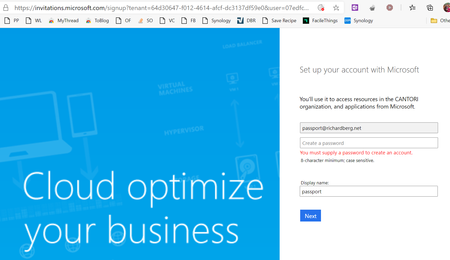
- User clicks on invitation mail link and receives link that an account with that email is already existing and user shall select another address
Do you have any experience on this?

JimGrisham
Apr 19, 2021Steel Contributor
Not directly. I did have an issue once, though, where a user (beth@contosocharity,org) had guest access the SharePoint site of a third party. ContosoCharity.org was switched to a new tenant, but Beth (even though her e-mail address remained unchanged) could not access that 3rd party SharePoint site, even if their admins removed her access and re-invited her. It took someone from MSFT support deleting some cached settings on their SharePoint site before this would work.
Have you tried creating an _entirely new_ e-mail account (e.g. at Gmail), and then inviting that to your service? That won’t help the user you’re trying to onboard, but it might help identify the scope of the problem.
Otherwise, I recommend just escalating this to MSFT support.
P.S. it may just be a typo in your message, but the account name you mentioned contains the string “#EXT#” _twice_.
From your description, it also looks like the account creation attempt may be happening twice (in steps 2 and 4 of your list). Can you leave out step 2 (where the AAD guest account is created) and just send the invitation? Alternatively, for troubleshooting purposes, if you manually reset the password of the guest account above, can this user now log on without using the invitation link?
Have you tried creating an _entirely new_ e-mail account (e.g. at Gmail), and then inviting that to your service? That won’t help the user you’re trying to onboard, but it might help identify the scope of the problem.
Otherwise, I recommend just escalating this to MSFT support.
P.S. it may just be a typo in your message, but the account name you mentioned contains the string “#EXT#” _twice_.
From your description, it also looks like the account creation attempt may be happening twice (in steps 2 and 4 of your list). Can you leave out step 2 (where the AAD guest account is created) and just send the invitation? Alternatively, for troubleshooting purposes, if you manually reset the password of the guest account above, can this user now log on without using the invitation link?
- matthias_fleschuetz_nttApr 19, 2021Tin ContributorThanks a lot, it turned out that it seems that it is really an issue with that particular live-/microsoft-account account (very strange orphan tenant in the background...).
We tried it out with a new fresh outlook.com address and there it worked.