Forum Discussion

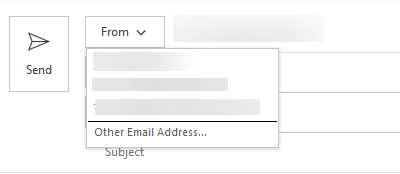
Shared and group mailbox addresses not appearing in "From:" field
- Nov 19, 2018
Hey Deleted,
I worked at a large IT services provider who did Exchange and Office 365 for tons of customers, so I have dealt with this type of complaint/issue allot.
I can tell you 99% of the time, after digging into these issues extensively with the client, it would come down to how the email addresses were configured in the outlook client. It looks like you have tested allot of options, and when I first read the title of your email, my first thought was "I bet you he is just having it automapped, and has never actually created the shared/group mailbox as an additional mailbox in the account."
So why it would be work, I would give that a try. Normally having the account actually added as an additional mailbox, rather than just mapped in, seems to help. I would try this on just one account. You may not even have to remove the auto-mapping, but just go through the process of adding an additional mailbox. Try the "manual steps" from here - https://support.office.com/en-us/article/open-and-use-a-shared-mailbox-in-outlook-d94a8e9e-21f1-4240-808b-de9c9c088afd
Once you have that in, restart your outlook, and see if when it comes back online you have the mailbox in the from field.
Goodluck!
Adam


There are two methods to "add" an entry to the From menu. The first one is to add the mailbox as additional account in Outlook, which exposes the full functionality, and is my preferred method to work with them. You can only do this for Shared mailboxes, not Group ones unfortunately.
The second method is sending at least one message via the From -> Other E-mail address -> From -> Selecting the object from the GAL. Depending on the permissions you have, and what you have added to the profile, you can either Send As or Send on behalf of. Once a message is sent successfully, the entry *should* appear under the From dropdown menu, with a small "x" next to it. A quick test on my current version of Outlook however does NOT add it, like it did previously. So it might be a change/regression introduced recently, which I will probe few folks about (version 1808, build 10730.20205 for the record).
In no case the entry will be automatically be populated based upon permissions, this is not how it works.
- DeletedNov 21, 2018Not applicable
Understood Vasil and that validates what I already knew. Problem is that the second method you suggested (which I already tried) did not work as expected. However, adding the shared mailbox as an account fits the bill until I turn on "Coming Sooon" in Outlook. When I do that, the accounts don't appear; even though other accounts that I do have setup, remain.