Forum Discussion

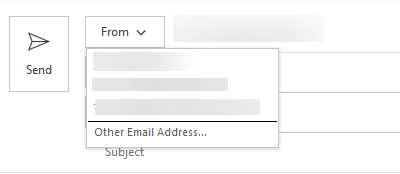
Shared and group mailbox addresses not appearing in "From:" field
- Nov 19, 2018
Hey Deleted,
I worked at a large IT services provider who did Exchange and Office 365 for tons of customers, so I have dealt with this type of complaint/issue allot.
I can tell you 99% of the time, after digging into these issues extensively with the client, it would come down to how the email addresses were configured in the outlook client. It looks like you have tested allot of options, and when I first read the title of your email, my first thought was "I bet you he is just having it automapped, and has never actually created the shared/group mailbox as an additional mailbox in the account."
So why it would be work, I would give that a try. Normally having the account actually added as an additional mailbox, rather than just mapped in, seems to help. I would try this on just one account. You may not even have to remove the auto-mapping, but just go through the process of adding an additional mailbox. Try the "manual steps" from here - https://support.office.com/en-us/article/open-and-use-a-shared-mailbox-in-outlook-d94a8e9e-21f1-4240-808b-de9c9c088afd
Once you have that in, restart your outlook, and see if when it comes back online you have the mailbox in the from field.
Goodluck!
Adam

Hey Deleted,
I worked at a large IT services provider who did Exchange and Office 365 for tons of customers, so I have dealt with this type of complaint/issue allot.
I can tell you 99% of the time, after digging into these issues extensively with the client, it would come down to how the email addresses were configured in the outlook client. It looks like you have tested allot of options, and when I first read the title of your email, my first thought was "I bet you he is just having it automapped, and has never actually created the shared/group mailbox as an additional mailbox in the account."
So why it would be work, I would give that a try. Normally having the account actually added as an additional mailbox, rather than just mapped in, seems to help. I would try this on just one account. You may not even have to remove the auto-mapping, but just go through the process of adding an additional mailbox. Try the "manual steps" from here - https://support.office.com/en-us/article/open-and-use-a-shared-mailbox-in-outlook-d94a8e9e-21f1-4240-808b-de9c9c088afd
Once you have that in, restart your outlook, and see if when it comes back online you have the mailbox in the from field.
Goodluck!
Adam
A second thought on how you can "confirm" this is outlook and not permissions.
If in OWA, you can open the shared mailbox (click on your name in the top right, open additional mailbox, type in the shared address). If that opens a new mailbox and you can send a mail from there, then 100% your permissions and setup are right. All you have left is your outlook configuration.
Adam
- DeletedNov 21, 2018Not applicable
Thanks for the feedback. Adding the shared mailbox as an account fits the bill until I turn on "Coming Soon" in Outlook. When I do that, the accounts don't appear; even though other accounts that I do have setup, remain. I suspect this will be addressed in the final release.