Forum Discussion

On-prem Exchange 2016 server & Outlook Account Settings photo
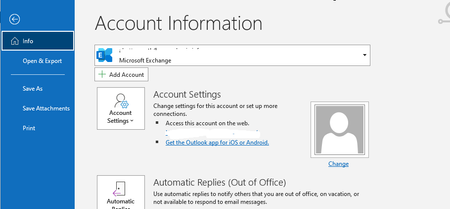

Did a bit more playing around today..
If we close Outlook and manually delete the OAB files - all files in:
\users\$username\AppData\Local\Microsoft\Outlook\Offline Address Books\$<GUID>\*
If we then start Outlook the user photo on the Account Information page is displayed. However the OABs are automatically refreshed once Outlook is running. If Outlook is closed and re-opened then it goes back to the blank photo.
On a Windows 10 client machine using Edge if I open this page:
https://mailserver.domain.com/ews/Exchange.asmx/s/GetUserPhoto?email=user@domain.com&size=HR240x240
I can see the photo. I can also change the resolution and Exchange dynamically resizes the image (HR96x96 etc). I can use the internal or external hostnames and it works each time.
If I browse from a non domain machine then I get prompted for credentials, but entering them brings up the photo.