Forum Discussion

Pharmalisk
Dec 05, 2024Copper Contributor
Xlookup using multiple criteria and itself
Hello, I am trying to automate a process of looking up values from two other sheets and I can't seem to get the last part down. I have the working sheet and I am looking to match the Line It...
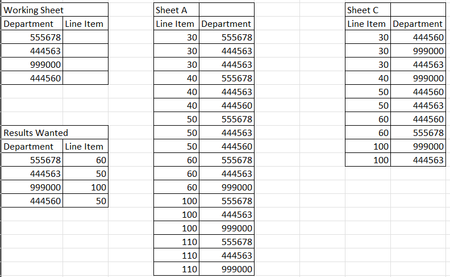
- Dec 05, 2024
In B2 on Working Sheet:
=LET(filterA, FILTER('Sheet A'!$A$2:$A$100, 'Sheet A'!$B$2:$B$100=A2, ""),
     filterB, FILTER('Sheet B'!$A$2:$A$100, 'Sheet B'!$B$2:$B$100=A2, ""),
     combined, FILTER(filterA, ISNUMBER(XMATCH(filterA, filterB)), ""),
     INDEX(combined, 1))

HansVogelaar
Dec 05, 2024MVP
In B2 on Working Sheet:
=LET(filterA, FILTER('Sheet A'!$A$2:$A$100, 'Sheet A'!$B$2:$B$100=A2, ""),
     filterB, FILTER('Sheet B'!$A$2:$A$100, 'Sheet B'!$B$2:$B$100=A2, ""),
     combined, FILTER(filterA, ISNUMBER(XMATCH(filterA, filterB)), ""),
     INDEX(combined, 1))

Mark_J_Walker
Dec 05, 2024Brass Contributor
This does not include the filter for Item Numbers, but I'm sure you have worked out how to include that.
=LET(filterA, FILTER('Sheet A'!$A$2:$A$100, ('Sheet A'!$A$2:$A$100>=50)*('Sheet A'!$A$2:$A$100<=100)*('Sheet A'!$B$2:$B$100=A2), ""),
     filterB, FILTER('Sheet B'!$A$2:$A$100, ('Sheet B'!$A$2:$A$100>=50)*('Sheet B'!$A$2:$A$100<=100)*('Sheet B'!$B$2:$B$100=A2), ""),
     combined, FILTER(filterA, ISNUMBER(XMATCH(filterA, filterB)), ""),
     INDEX(combined, 1))