Forum Discussion

Pharmalisk
Dec 05, 2024Copper Contributor
Xlookup using multiple criteria and itself
Hello, I am trying to automate a process of looking up values from two other sheets and I can't seem to get the last part down. I have the working sheet and I am looking to match the Line It...
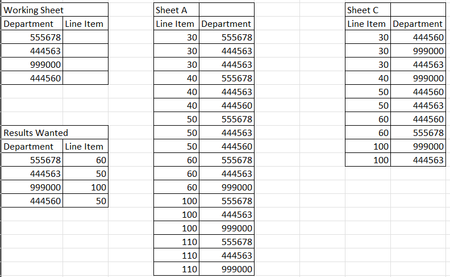
- Dec 05, 2024
In B2 on Working Sheet:
=LET(filterA, FILTER('Sheet A'!$A$2:$A$100, 'Sheet A'!$B$2:$B$100=A2, ""),
     filterB, FILTER('Sheet B'!$A$2:$A$100, 'Sheet B'!$B$2:$B$100=A2, ""),
     combined, FILTER(filterA, ISNUMBER(XMATCH(filterA, filterB)), ""),
     INDEX(combined, 1))


Mark_J_Walker
Dec 05, 2024Brass Contributor
Hi,
See attached, which I hope works for you. I'm using the FILTER() function and also other array formulas
The resulting formula is
=LET(
dept,         selectedDept,
shtAItems,    SORT(FILTER(tbSheetA[ITEM],(tbSheetA[ITEM]>=50)*(tbSheetA[ITEM]<=100)*(tbSheetA[DEP]=dept))),
shtBItems,    SORT(FILTER(tbSheetB[ITEM],(tbSheetB[ITEM]>=50)*(tbSheetB[ITEM]<=100)*(tbSheetB[DEP]=dept))),
doItemsMatch, IFERROR(shtAItems=shtBItems,FALSE),
uniqueList,   UNIQUE(VSTACK(shtAItems,shtBItems)),
filterMatched, FILTER(uniqueList,doItemsMatch=TRUE),
IFERROR(TAKE(filterMatched,1),"Not Found")
)
I have used tables for the SheetA and SheetB data as it's my pref. but not required.
Formula Breakdown
Step1 Get a list of matching items in SheetA matching the Department Code AND where the ITEM>=50 and <=100
Step2 Get a list of matching items in SheetB matching the Department Code AND where the ITEM>=50 and <=100
Step3 Compare the 2 lists, if they match we get a TRUE else FALSE
Step4 Build a unique list of items by combining the 2 lists
Step5 Filter the combined list by the step3 comparisons
Result Take the first matching item if more than 1