Forum Discussion

macreutter
Oct 17, 2024Copper Contributor
Writing macro to add new calculated unit and include it in existing formulas
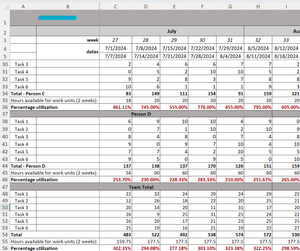
I have this sheet formatted so that cell 34 is performing a calculation on cells C28-C33 and then adding the sums of those calculations. Cell C46 is then dividing cell 34 by row C25. The same pattern...
- Oct 19, 2024
Attached is an attempt to adapt the existing code.
Sub Add_Team_Member()
    Dim ws As Worksheet
    Dim lastRow As Long
    Set ws = ThisWorkbook.Sheets(1) ' Adjust the sheet name as needed

    ' Find the last row for existing team members
    lastRow = ws.Cells(ws.Rows.Count, "A").End(xlUp).Row

    ' Copy the template row (adjust the row range to match your template structure)
    ws.Rows("7:16").Copy
    ' Insert the copied rows below the last team member (adjust as needed)
    ws.Rows(lastRow + 1).Insert Shift:=xlDown
    ws.Range("A" & lastRow + 1 & ":H" & lastRow + 1).Value = "New Team Member"

    ' Clear the contents of specific cells for the new member's calculations
    ws.Range("C" & lastRow + 2 & ":K" & lastRow + 8).ClearContents

    ' Update the team total formula
    Call Update_Team_Totals
End Sub

Sub Update_Team_Totals()
    Dim ws As Worksheet
    Dim lastRow As Long
    Dim startRow As Long
    Dim endRow As Long

    Set ws = ThisWorkbook.Sheets(1) ' Adjust the sheet name as needed

    ' Find the first row of team members (row 7 in this case)
    startRow = 7

    ' Find the last row of team members by checking for the last filled cell in column A
    lastRow = ws.Cells(ws.Rows.Count, "A").End(xlUp).Row

    ' Determine the row range for summing team members' values (adjust column range if needed)
    endRow = lastRow - 1 ' Adjust depending on where calculations for individuals end

    ' Update the formula in the "Team Totals" row (assuming row 50 is for Team Totals)
    ws.Range("C50").Formula = "=SUM(C" & startRow & ":C" & endRow & ")"
    ws.Range("C50").AutoFill Destination:=ws.Range("C50:K50"), Type:=xlFillDefault

    ' Update calculations in row 54 (based on rows 48-53) and row 56 (divide by row 55)
    ws.Range("C54").Formula = "=(C48+C49+C50+C51+C52+C53)"
    ws.Range("C54").AutoFill Destination:=ws.Range("C54:K54"), Type:=xlFillDefault
    ws.Range("C56").Formula = "=C54/C55"
    ws.Range("C56").AutoFill Destination:=ws.Range("C56:K56"), Type:=xlFillDefault

    ' Inform the user
    MsgBox "New team member added and totals updated successfully!", vbInformation
End Sub
Hope that it helps you 😊

NikolinoDE
Oct 19, 2024Platinum Contributor
Attached is an attempt to adapt the existing code.
Sub Add_Team_Member()
    Dim ws As Worksheet
    Dim lastRow As Long
    Set ws = ThisWorkbook.Sheets(1) ' Adjust the sheet name as needed

    ' Find the last row for existing team members
    lastRow = ws.Cells(ws.Rows.Count, "A").End(xlUp).Row

    ' Copy the template row (adjust the row range to match your template structure)
    ws.Rows("7:16").Copy
    ' Insert the copied rows below the last team member (adjust as needed)
    ws.Rows(lastRow + 1).Insert Shift:=xlDown
    ws.Range("A" & lastRow + 1 & ":H" & lastRow + 1).Value = "New Team Member"

    ' Clear the contents of specific cells for the new member's calculations
    ws.Range("C" & lastRow + 2 & ":K" & lastRow + 8).ClearContents

    ' Update the team total formula
    Call Update_Team_Totals
End Sub

Sub Update_Team_Totals()
    Dim ws As Worksheet
    Dim lastRow As Long
    Dim startRow As Long
    Dim endRow As Long

    Set ws = ThisWorkbook.Sheets(1) ' Adjust the sheet name as needed

    ' Find the first row of team members (row 7 in this case)
    startRow = 7

    ' Find the last row of team members by checking for the last filled cell in column A
    lastRow = ws.Cells(ws.Rows.Count, "A").End(xlUp).Row

    ' Determine the row range for summing team members' values (adjust column range if needed)
    endRow = lastRow - 1 ' Adjust depending on where calculations for individuals end

    ' Update the formula in the "Team Totals" row (assuming row 50 is for Team Totals)
    ws.Range("C50").Formula = "=SUM(C" & startRow & ":C" & endRow & ")"
    ws.Range("C50").AutoFill Destination:=ws.Range("C50:K50"), Type:=xlFillDefault

    ' Update calculations in row 54 (based on rows 48-53) and row 56 (divide by row 55)
    ws.Range("C54").Formula = "=(C48+C49+C50+C51+C52+C53)"
    ws.Range("C54").AutoFill Destination:=ws.Range("C54:K54"), Type:=xlFillDefault
    ws.Range("C56").Formula = "=C54/C55"
    ws.Range("C56").AutoFill Destination:=ws.Range("C56:K56"), Type:=xlFillDefault

    ' Inform the user
    MsgBox "New team member added and totals updated successfully!", vbInformation
End Sub
Hope that it helps you 😊
 macreutterOct 22, 2024Copper ContributorThank you!