Forum Discussion

rcasquinha
Feb 13, 2021Copper Contributor
Why the formula large return 0
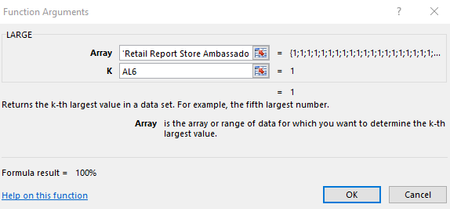
Hello I'm using this formula =LARGE('Retail Report Store Ambassador'!EQ8:EQ229;AL6) it's showing that return 100% but what I get value 0 I'm using this formula and work only in this colum...

NikolinoDE
Feb 14, 2021Platinum Contributor
As Mr. Rajesh-S recommended to you, explain your problem in detail. So you can get a solution proposal to your problem much faster.
At the same time, it is much easier for someone who wants to help to understand the subject.
A win-win situation for everyone.
It is also helpful to know the operating system and Office/Outlook version, as different approaches may be required depending on the Office version and OS.
If all of this is too cumbersome for you, here is some information from Microsoft about percentages that may help you.
Format numbers as percentages
Thank you for your understanding and patience
Nikolino
I know I don't know anything (Socrates)