Forum Discussion

why hstack change the cell type ?
 Mar 16, 2023Internally and until passed to the worksheet, yes.

yushang That's not specific to HSTACK. In modern Excel a reference like =A1:A9 will spill all 9 cells in one instance, replacing empty cells by zeroes. That's by design, I believe.
If you want to avoid that behaviour use this in stead:
=IF(A1:A9="","",A1:A9)
In your case the formula would become:
=HSTACK(SEQUENCE(9),IF(A1:A9="","",A1:A9))
Or you could suppress the zeros by a custom number format, conditional formatting or by changing a workbook setting so that zeros are not displayed.
 yushangMar 16, 2023Brass Contributor
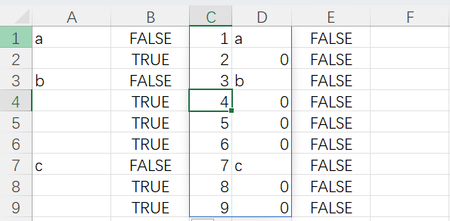
Riny_van_Eekelen But this is really strange , have look at following figure please. I fill B1 with formula
=LET(x,HSTACK(SEQUENCE(9),A1:A9),HSTACK(x,BYROW(x,LAMBDA(row,ISBLANK(INDEX(row,2))))))
D2 show that C2 is blank, but what C2 show is zero. So what's the real value of C2? Many thanks!
- JosWoolleyMar 16, 2023Iron Contributor
Why is it so strange? Internally, those are considered blanks, though when returned to actual worksheet cells they are by default rendered as numerical zeroes.
- yushangMar 16, 2023Brass Contributor
JosWoolley So both values of A2 and C2 are blanks? If so, why are they rendered differently with the same cell format (I've changed cell format of A2 and C2 to the same)? Many thanks!