Forum Discussion

KyneStaley1
Feb 22, 2023Copper Contributor
When using IF formula how to return blank cell if error
Hi all, Thanks for the help in advance. I have 2 issues which I'm having trouble with. 1. I'm currently trying to create an excel document which will subtract one cell from another however wh...
 Feb 22, 2023
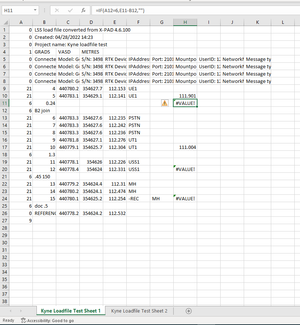
=IFERROR(IF(A12=6,E11-B12,""),"")This is the formula in sheet 1 which returns an empty cell in case of an error in my worksheet.
=IF(ISERROR(IF('Kyne Loadfile Test 1'!A12=6,'Kyne Loadfile Test 1'!E11-'Kyne Loadfile Test 1'!B12,"")),'Kyne Loadfile Test 1'!E11,'Kyne Loadfile Test 1'!H11)This formula returns the value from cell E11 of sheet 1 if there is an error in the calculation E11-B12.
Kyne Loadfile Test 1:
Kyne Loadfile Test 2:
.
OliverScheurich
Feb 23, 2023Gold Contributor
=IF(AND('Kyne Loadfile Test 1'!H9="",'Kyne Loadfile Test 1'!E9=""),"",IF('Kyne Loadfile Test 1'!H9="",'Kyne Loadfile Test 1'!E9,'Kyne Loadfile Test 1'!H9))This is the formula in cell E9 of sheet "Kyne Loadfile Test 2" which returns the expected results in the attached file.

KyneStaley1
Feb 23, 2023Copper Contributor
That's worked.
Thankyou so much for you help!
Thankyou so much for you help!