Forum Discussion

Radoslavov91
Oct 25, 2021Copper Contributor
VLOOKUP show wrong values
Hi all, i have the following problem with an excel function. I have a file with two sheets, sheet one (AD-Export) contains data for the employees (such as first name, email, department) and the s...
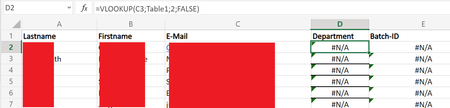
- Oct 25, 2021
As HansVogelaar suggested
=IFNA( INDEX(Table1[Batch-ID], MATCH(Scouts!C2, Table1[mail], 0) ), "no such")

Radoslavov91
Oct 25, 2021Copper Contributor
Thank you Sergei, and the rest of the people spare time to help me.
It worked, i was just wondering what it was so complex the whole formula, I've watched so many tutorials on using VLOOKUP and they were fairly simple, but in my case that wasn't the situation i guess .
Thank you all again, stay safe!
Regards
Kiril
It worked, i was just wondering what it was so complex the whole formula, I've watched so many tutorials on using VLOOKUP and they were fairly simple, but in my case that wasn't the situation i guess .
Thank you all again, stay safe!
Regards
Kiril

SergeiBaklan
Oct 25, 2021Diamond Contributor
That was one of few reasons why XLOOKUP() was introduced - VLOOKUP() works only to the right and use fixed returned column number; INDEX/MATCH looks bit complex for many users.