Forum Discussion

GKGK13
Mar 19, 2024Copper Contributor
VLOOKUP Question (Reference Sheet and Blanks)
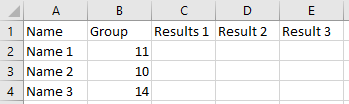
Hello, I need help creating a VLOOKUP formula to fill Sheet 1. This is based on reference data that is contained within Sheet 2. An example of what the results should look like is shown within ...
- Mar 21, 2024
FILTER is available in Microsoft 365 and Office 2021, not in older versions.
In C2:
=IFERROR(IF(VLOOKUP($B2,'REFERENCE DATA'!$A$2:$D$4,COLUMN()-1,FALSE)="","",VLOOKUP($B2,'REFERENCE DATA'!$A$2:$D$4,COLUMN()-1,FALSE)),"")
Replace REFERENCE DATA with the actual name of the data sheet.
Fill to the right to column E, then down to row 4 (or vice versa).


Detlef_Lewin
Mar 19, 2024Silver Contributor
Try this:
=FILTER(Tabelle2!$B$2:$D$4,Tabelle2!$A$2:$A$4=B2)&"" GKGK13Mar 21, 2024Copper ContributorI copied that exact formula into Sheet 1, Cell C2 and got a message saying "That function isn't valid".
I'm not familiar with the Filter function. What is Tabelle2?- HansVogelaarMar 21, 2024MVP
FILTER is available in Microsoft 365 and Office 2021, not in older versions.
In C2:
=IFERROR(IF(VLOOKUP($B2,'REFERENCE DATA'!$A$2:$D$4,COLUMN()-1,FALSE)="","",VLOOKUP($B2,'REFERENCE DATA'!$A$2:$D$4,COLUMN()-1,FALSE)),"")
Replace REFERENCE DATA with the actual name of the data sheet.
Fill to the right to column E, then down to row 4 (or vice versa).
- GKGK13Mar 21, 2024Copper Contributor
This worked. Thank you HansVogelaar
- Detlef_LewinMar 21, 2024Silver Contributor