Forum Discussion

Vlookup help
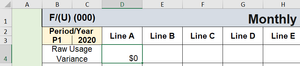

Use this, confirmed with Ctrl+Shift+Enter to turn it onto an array formula:
=IFERROR(INDEX(Data!$D$2:$D$100, MATCH(1, (Data!$A$2:$A$100=D2)*(Data!$B$2:$B$100=C3)*(Data!$C$2:$C$100=B3), 0)), "")
Adjust the ranges if needed.

With vlookup you can vlookupcomment. Can you do the same with index match?
- HansVogelaarMar 08, 2021MVP
VlookupComment is not a built-in function, but a custom VBA function (see How to vlookup and return matching value with cell comment?)
You'd need a custom function here too. For example
Function IndexMatchComment(DataRange As Range, ParamArray Conditions()) As Variant
    ' Adapted from Extendoffice
    Dim r As Long
    Dim i As Long
    Dim f As Boolean
    Dim s As String
    Dim xRet As Variant 'could be an error
    Dim xCell As Range
    Application.Volatile
    With Application.Caller
        If Not .Comment Is Nothing Then
            .Comment.Delete
        End If
    End With
    For r = 1 To DataRange.Rows.Count
        f = True
        For i = 0 To UBound(Conditions) Step 2
            If Conditions(i)(r) <> Conditions(i + 1) Then
                f = False
                Exit For
            End If
        Next i
        If f Then
            Set xCell = DataRange.Cells(r, 1)
            IndexMatchComment = xCell.Value
            With Application.Caller
                If Not xCell.Comment Is Nothing Then
                    .AddComment xCell.Comment.Text
                End If
            End With
            Exit Function
        End If
    Next r
    IndexMatchComment = "N/A"
End Function
Use like this in D4 on the Variance sheet:
=IndexMatchComment(Data!$D$2:$D$5,Data!$A$2:$A$5,Sheet5!D$2,Data!$B$2:$B$5,Sheet5!$C3,Data!$C$2:$C$5,Sheet5!$B3)
Fill to the right.
- ccivitella01Mar 10, 2021Copper ContributorThanks for the information. i will try it.
- ccivitella01Mar 10, 2021Copper Contributor
When I tried Hans solution I got a #VALUE! error. When I tried JMB17 solution, it did not return any results. I tried the formula in cell D18 on the Monthly Variance Report tab.
 JMB17Mar 09, 2021Bronze Contributor
I think you could take advantage of Index's ability to pass a cell by reference. Perhaps shorten the UDF to:
Public Function IndexMatchComment(arg As Variant) As Variant
     Application.Volatile True

     If TypeName(arg) = "Range" Then
          With Application.Caller
               If Not .Comment Is Nothing Then .Comment.Delete
               If Not arg.Comment Is Nothing Then .AddComment arg.Comment.Text
          End With
     End If

     IndexMatchComment = arg

End Function
Then, use your UDF as a wrapper for the usual Index/Match:
=indexmatchcomment(INDEX(Data!D2:D100,MATCH(1,(Data!A2:A100=D2)*(Data!B2:B100=C3)*(Data!C2:C100=B3),0)))
- ccivitella01Mar 10, 2021Copper ContributorThanks for the information and the simplification. i will try it.