Forum Discussion

Karla Ruelas
Jul 11, 2018Copper Contributor
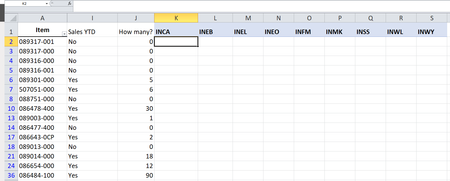
VLOOKUP, ARRAY, ROW, COLUMN please help!!!
I need a formula that will search the item # from table 1 in table 2 and display the number for each individual category ("inca", "ineb", etc.) The lines that do not have sales I want it to display a...

Man Fai Chan
Jul 11, 2018Iron Contributor
Is the following formula help:
IF($J2>0,VLOOKUP($A2,Table_2!$A:$K, COLUMN(B2),FALSE),"")
I assume that the table 2 is stored in a sheet called <Table_2>. However, I notice that your table_2 is a pivot table, I am not sure it works properly.

Wyn Hopkins
Jul 11, 2018MVP
Hi Man Fai Chan,
Just a suggestion that the reference to COLUMN(B2) could be quite a risky approach as if a new column is inserted to the left of COLUMN B then the formula will still work but the wrong results will be returned.
If using this approach then you should reference COLUMN(Table_2!B:B) to be a bit safer. However this also will go wrong if someone inserts a column in Table_2 column A.
I'd go with SUMIFS or INDEX MATCH to be a safer.
Just talking from learning this the hard way :)
Just a suggestion that the reference to COLUMN(B2) could be quite a risky approach as if a new column is inserted to the left of COLUMN B then the formula will still work but the wrong results will be returned.
If using this approach then you should reference COLUMN(Table_2!B:B) to be a bit safer. However this also will go wrong if someone inserts a column in Table_2 column A.
I'd go with SUMIFS or INDEX MATCH to be a safer.
Just talking from learning this the hard way :)
- Man Fai ChanJul 12, 2018Iron Contributor
Dear Wyn Hopkins,
Thanks for sharing.
Cheers
Chan M F