Forum Discussion

cookma423
Feb 06, 2019Copper Contributor
Vertical Line Charts
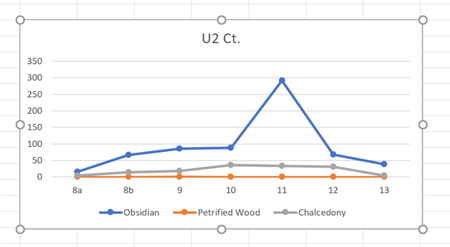
Hey Everyone! I've been working on this problem for a few days now and I can't get it going. I need to create a vertical line chart. It's easier to show in photos. I have this.... I wan...

JKPieterse
Feb 07, 2019Silver Contributor
You could try:
- Create the chart as Excel defaults to
- Select the cells behind the chart and choose (using the drop-down arrow next to the copy button on the home tab): Copy Picture
- Choose the option you want
- Click where you want the transposed pifture to be and click Paste
- Click in the formula bar, type the equal sign and -again- select the cells underneath the original chart and press enter
- Now rotate the picture (not the chart)
- Try changing anyhting in the chart or its data and see the picture update itself.
See attached example

cookma423
Feb 08, 2019Copper Contributor
That does seem to work. So far it's created issues just with trying to get the legend to format. I'll keep it in mind. Still wish Excel could just present the chart the way I'd like.
Thanks for the help!
- JKPieterseFeb 09, 2019Silver ContributorYou're welcome!