Forum Discussion

Lorenzo Kim
Jun 17, 2018Bronze Contributor
vba to suppress subtotal prompt
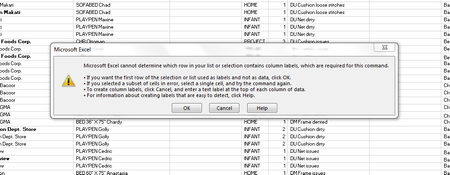
When I used DATA>subtotal to remove all , a prompt (see below) always appears, can I suppress it with vba to default as OK so that it will not show? many thanks

JKPieterse
Jun 18, 2018Silver Contributor
I would suggest to solve the issue itself. Make sure the columns with your subtotalled data have one row with heading information. Each column must have a unique column name in one single cell. To force Excel to recognize it is a header, format the header differntly from the remaining rows, e.g. by setting the font to Bold.

Lorenzo Kim
Jun 18, 2018Bronze Contributor
Mr Pieterse
Thank you for your suggestion.
many thanks
Thank you for your suggestion.
many thanks
- JKPieterseJun 18, 2018Silver ContributorDid the suggestion work?
- Lorenzo KimJun 18, 2018Bronze Contributor
Mr. Pieterse
After making what you suggested, the prompt didn't appear again.
many many thanks
- JKPieterseJun 19, 2018Silver ContributorExcellent, glad I could be of help.