Forum Discussion

Lorenzo Kim
Jun 17, 2018Bronze Contributor
vba to suppress subtotal prompt
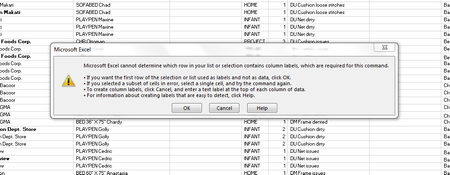
When I used DATA>subtotal to remove all , a prompt (see below) always appears, can I suppress it with vba to default as OK so that it will not show? many thanks

JKPieterse
Jun 18, 2018Silver Contributor
I would suggest to solve the issue itself. Make sure the columns with your subtotalled data have one row with heading information. Each column must have a unique column name in one single cell. To force Excel to recognize it is a header, format the header differntly from the remaining rows, e.g. by setting the font to Bold.
- Lorenzo KimJul 09, 2018Bronze Contributor
I found an article to suppress prompt by using:
Application.DisplayAlerts = False
then revert it to True afterwards.
This of course should only be done if all issues have been addressed.
thanks
- JKPieterseJul 10, 2018Silver ContributorI agree, this is a catch-all approach which is not the best way to address the above issue. It *is* useful in some other cases however.
- Lorenzo KimJul 10, 2018Bronze Contributor
thank you
- Lorenzo KimJun 18, 2018Bronze ContributorMr Pieterse
Thank you for your suggestion.
many thanks- JKPieterseJun 18, 2018Silver ContributorDid the suggestion work?
- Lorenzo KimJun 18, 2018Bronze Contributor
Mr. Pieterse
After making what you suggested, the prompt didn't appear again.
many many thanks
