Forum Discussion

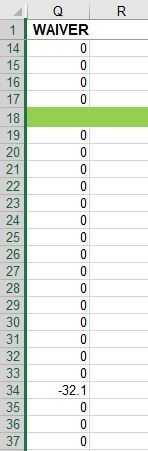
vba to find last row with value not equals to 0
- Aug 05, 2022
Alternatively, let Excel figure it out by evaluating a formula:
LastRowNonZero = [MAX((Q2:Q1000<>0)*ROW(Q2:Q1000))]
or
LastRowNonZero = Evaluate("MAX((Q2:Q1000<>0)*ROW(Q2:Q1000))")

Alternatively, let Excel figure it out by evaluating a formula:
LastRowNonZero = [MAX((Q2:Q1000<>0)*ROW(Q2:Q1000))]
or
LastRowNonZero = Evaluate("MAX((Q2:Q1000<>0)*ROW(Q2:Q1000))")
 hrh_dashAug 05, 2022Iron Contributor
hi HansVogelaar , the code works but rows varies from workbook to workbook, therefore is it possible to have the code in dynamic?
appreciate the assistance!
- HansVogelaarAug 05, 2022MVP
What is the highest row number of a cell with a non-zero value that you expect in any workbook? If it will never be more than 1000, the code that I posted will be sufficient. But if it could be up to - say - 15000, simply change 1000 to 15000 in the code. It doesn't matter if 15000 is too high for most of the workbooks.
- hrh_dashAug 06, 2022Iron Contributorthat is true as well, i dont think the data would could go up to more than 5000. thanks for the assistance!