Forum Discussion

VBA: Moving a row to new sheet based on list item
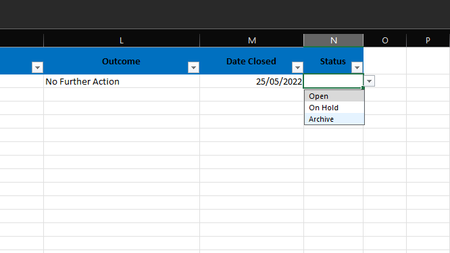

Hi Patrick2788,
Thanks very much for your response.
Is there a way to automatically delete the row from 'Open or Hold' when archive is selected from the list and it moves over to the 'archive' sheet?
So its almost like cutting and pasting the row over to the archive tab when archive is selected from the drop-down and deleting the blank row which is left.
In any case, I'm one step closer to the goal so thank you!
Chris

There are ways to conditionally format the rows to be removed so they appear 'blank' but that's a cell formatting trick - window dressing (The actual rows wouldn't be deleted).
- Chris_MundayJun 01, 2022Copper Contributor
FYI, I've found the code which works:
Private Sub Worksheet_Change(ByVal Target As Range)
Dim fromRow%, archiveRow%, archiveList As Worksheet
If Target.Cells.Count > 1 Then Exit Sub
If Not Application.Intersect(Target, Range("N2:N10")) Is Nothing Then 'amend this range address to your
Set archiveList = ThisWorkbook.Worksheets("Archive")
If Target.Value = "Archive" Then
fromRow = ActiveCell.Row
archiveRow = archiveList.Cells(archiveList.Rows.Count, 1).End(3).Row + 1
Range(Cells(fromRow, 1), Cells(fromRow, 13)).Copy archiveList.Cells(archiveRow, 1)
Rows(fromRow).EntireRow.Delete
End If
End If
End SubThe sheet names will obviously need to be changed to correspond.