Forum Discussion

SeanG1246
Oct 28, 2021Copper Contributor
VBA Macro to replace data based on matching ID columns
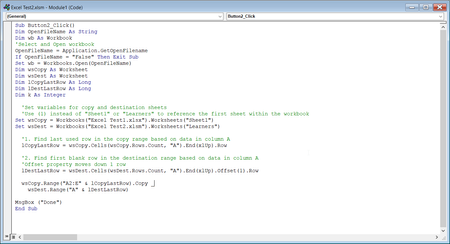
Hi Guys, I am very new to VBA and I have a pretty specific requirement that I could use some help with figuring out. The code above is used inside of a button in order to open up a differen...

mtarler
Nov 01, 2021Silver Contributor
first off i don't get what/why you are setting your variables that way. in particular why not just assign wb as: set wb=activeworkbook or not at all since you aren't even using wb.
but then I would ask why you are hard coding the copy and master sheets, but maybe this is all just part of the 'sample' and not your real macro.
to answer your question there are a couple of options.
either way you need to do a loop.
A) after you copy the new data over you could loop through all the data and if a match is found then delete the row you don't want. Something like this:
iRow=1
Do While len(wsDest.cells(iRow,1).value2)>1
For jRow = 1 to iRow-1
if wsDest.cells(iRow,1).value2 = wsDest.cells(jRow,1) then
wsDest.cells(jRow,1).entirerow.delete
exit For
end if
next jRow
Loop
B) instead of doing the bulk copy
wsCopy.Range("A2:E" & ...
do a loop (example below) instead and check each value against the existing sheet data and either replace a row or add it to the end.
iRow=1
For iRow = 1 to lCopyLastRow
For jRow = 1 to lDestLastRow
if wsDest.cells(iRow,1).value2 = wsDest.cells(jRow,1) then
exit For
end if
next jRow
wsCopy.Range("A"&iRow&":E"&iRow).copy wsDest.Range("A"&jRow&":E"&jRow)
if jRow>lDestLastRow then lDestLastRow=jRow
next iRow
I didn't actually put this into VBA and create fake data and test so I apologize if there is a bug or two but it should be pretty close.
but then I would ask why you are hard coding the copy and master sheets, but maybe this is all just part of the 'sample' and not your real macro.
to answer your question there are a couple of options.
either way you need to do a loop.
A) after you copy the new data over you could loop through all the data and if a match is found then delete the row you don't want. Something like this:
iRow=1
Do While len(wsDest.cells(iRow,1).value2)>1
For jRow = 1 to iRow-1
if wsDest.cells(iRow,1).value2 = wsDest.cells(jRow,1) then
wsDest.cells(jRow,1).entirerow.delete
exit For
end if
next jRow
Loop
B) instead of doing the bulk copy
wsCopy.Range("A2:E" & ...
do a loop (example below) instead and check each value against the existing sheet data and either replace a row or add it to the end.
iRow=1
For iRow = 1 to lCopyLastRow
For jRow = 1 to lDestLastRow
if wsDest.cells(iRow,1).value2 = wsDest.cells(jRow,1) then
exit For
end if
next jRow
wsCopy.Range("A"&iRow&":E"&iRow).copy wsDest.Range("A"&jRow&":E"&jRow)
if jRow>lDestLastRow then lDestLastRow=jRow
next iRow
I didn't actually put this into VBA and create fake data and test so I apologize if there is a bug or two but it should be pretty close.